
Process Invoices in 60 Seconds: How SMBs Save 4+ Hours Weekly with AI
Stop wasting 5-10 minutes per invoice on manual data entry. AI processing saves 4+ hours weekly — with 99.9% accuracy vs the 1-4% error rate of manual entry. Most SMBs see ROI in 30 days. Free to start.
Marcus runs purchasing for a 15-person food distributor. Last month, he discovered they'd been overcharged £3,200 over six months—on invoices he'd "checked" manually. According to APQC research, manual invoice processing costs $12-20 per invoice with 1-4% error rates. AI extraction cuts this to under 60 seconds with 99%+ accuracy—and most SMBs recover $2,400-$4,800 annually without hiring anyone.
The Numbers That Matter
- Manual data entry error rate: 1-4% — errors that become overpayments nobody catches until quarterly audits
- On $200K annual procurement: a 2% overpayment rate costs $4,000/year — 20x more than AI processing software
- Top-performing AP teams process at $2.88/invoice vs $12.88 industry average (APQC 2024, Ardent Partners)
- Automated procurement teams handle POs 76% faster at 55% lower cost (The Hackett Group)
Nobody started a business because they loved typing line items into Excel on a Sunday night. Yet here we are — most small businesses don't have dedicated accounts payable staff, so the person processing invoices is also managing operations, handling customer service, and reviewing vendor contracts. Invoice data entry takes 5-10 minutes per document and introduces 1-4% errors that go undetected until they become overpayments. AI invoice processing eliminates this bottleneck. Here's how it works and when it makes sense for your business.
The Cost of Waiting: Every month you process invoices manually costs you 4+ hours of productive time plus 1-4% in undetected errors. On $200K annual procurement, that's $2,000-$8,000 in silent overpayments — money that could be funding marketing, inventory, or your own salary.
What business owners are saying:
"I was spending every Sunday evening catching up on invoices. Now I snap photos during deliveries and review everything Monday morning over coffee. Found $3,200 in duplicate charges in the first month." — Mike Thompson, Owner, Thompson Building Supplies, Leeds
"The 99.9% accuracy sounds like marketing — until you see the confidence scores on every field. I know exactly which 3 line items to double-check out of 200." — Jennifer Walsh, Operations Director, Coastal Distribution Ltd
Q: What is invoice automation and does TRO Matcher provide it? A: Invoice automation digitizes invoice processing from receipt to accounting software. Tools like Hubdoc, Dext, and Autoentry offer extraction. TRO Matcher adds vendor comparison to find savings—the core functions bookkeepers, accountants, and small business owners need. Export to QuickBooks or Xero with one click.
Contents
- What is AI invoice processing?
- How invoice digitization works for SMBs
- AI invoice data extraction explained
- Automating invoice data entry (no more spreadsheets)
- How to convert PDF invoices to CSV
- Comparing vendor quotes automatically
- Choosing the right AI invoice tool for your business
- Implementation: from paper to automated in 5 minutes
- Real scenario: Sarah's wholesale distribution company
- Common concerns (honest answers)
- ROI calculator: is AI invoice processing worth it?
- FAQ
What is AI invoice processing?
AI invoice processing is the complete workflow of converting invoices from any source — paper documents, PDF files, email attachments, phone photos — into structured digital data that flows directly into your accounting software. It replaces manual data entry, spreadsheet comparison, and error-prone copy-paste workflows.
The AI invoice processing workflow:
Paper/PDF Invoice → AI Digitization → Data Extraction → Review → Export/Compare
       ↓                  ↓                 ↓             ↓           ↓
   Any format        60 seconds      Fields identified   Confidence  CSV for
   (8 types)         processing      automatically       scores      QuickBooks/Xero
What makes it different from traditional OCR:
| Capability | Template-Based OCR | AI Invoice Processing |
|---|---|---|
| Setup required | Configure templates per vendor | None — works immediately |
| New invoice formats | Requires new template | Handles automatically |
| Accuracy | 85-92% (varies by template quality) | 99.9% with confidence scoring |
| Field identification | Predefined positions only | Understands context and layout |
| Error handling | Fails silently on format changes | Flags uncertain fields for review |
| Processing time | Variable | ~60 seconds consistently |
For SMBs, the key advantage is zero configuration. Upload an invoice from any vendor in any format, and the AI identifies vendor name, invoice number, date, line items, quantities, unit prices, totals, and payment terms — without you defining where those fields appear.
"AI invoice processing combines three historically separate tasks — digitization, extraction, and comparison — into a single automated workflow. For small businesses without dedicated AP staff, this means invoice review happens in minutes instead of being deferred to 'when there's time.'"
How invoice digitization works for SMBs
Invoice digitization converts paper invoices, scanned documents, and PDF files into structured digital data. For SMBs, this solves a fundamental problem: your invoice data exists, but it's trapped in unusable formats.
Where your invoice data gets stuck:
- Paper invoices sit in filing cabinets, unsearchable
- PDF invoices scatter across email inboxes
- Phone photos disappear into camera rolls
- Supplier portal downloads come in inconsistent formats
None of this flows into QuickBooks or Xero without manual retyping. And retyping is where errors happen.
What digitization enables:
| Before | After |
|---|---|
| Manual folder browsing to find an invoice | Instant keyword search |
| No price history unless manually logged | Automatic tracking over time |
| Hours gathering documents for audits | One-click export |
| Vendor analysis requires spreadsheet compilation | Built-in comparison across suppliers |
The AI extraction process handles the conversion: upload in any format, get structured data out. But digitization is just the first step — the real value comes from what you can do with searchable, comparable data.
AI invoice data extraction explained
AI invoice data extraction is the core technology that reads invoice documents and identifies individual fields automatically. Unlike form recognition that requires templates, AI extraction understands document context and adapts to any invoice layout.
How AI extraction differs from traditional OCR:
Traditional OCR converts images to text. AI extraction goes further — it understands that "Total: $1,234.56" is a total amount, "Qty: 100" is a quantity, and "ACME Corp" at the top is the vendor name. This contextual understanding works across invoice formats without configuration.
The extraction process:
- Document intake: PDF, image, or photo uploaded
- Visual analysis: AI identifies document structure, tables, headers
- Field extraction: Key fields identified with confidence scores
- Validation: Cross-checks (do line items sum to total?)
- Output: Structured data ready for export or comparison
Confidence scoring: knowing what to review
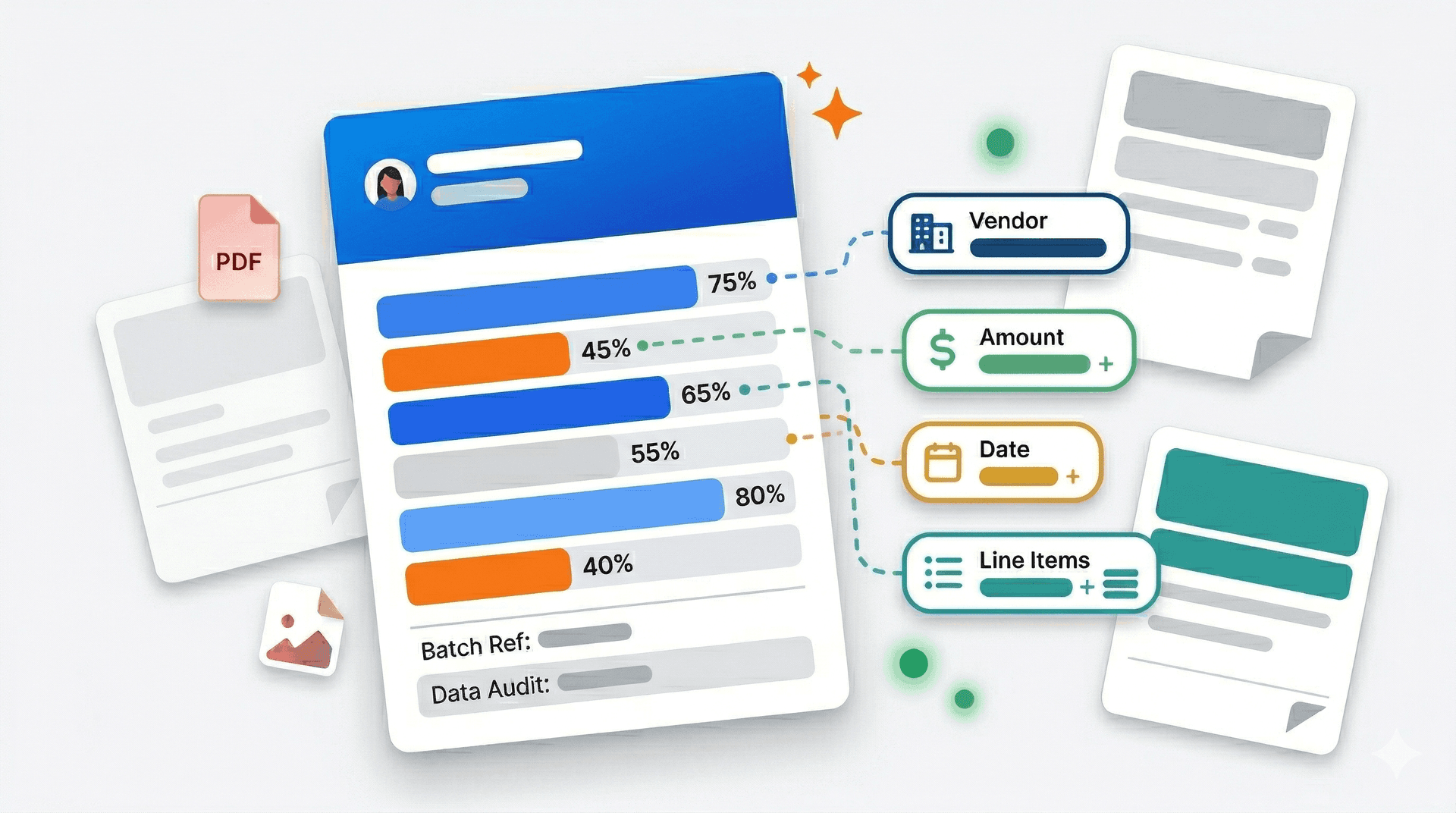
Every extracted field includes a confidence score (0-100%) indicating the AI's certainty. High-confidence fields (99.9%) rarely need review. Low-confidence fields (<80%) are flagged for human verification.
| Confidence Level | What It Means | Action Required |
|---|---|---|
| 95-100% | AI is certain | Quick scan sufficient |
| 80-94% | Likely correct, verify | Review against source |
| 60-79% | Uncertain | Manual verification needed |
| Below 60% | Low confidence | Check original document |
This scoring eliminates the hidden risk of manual entry — instead of errors flowing through undetected, uncertain extractions are flagged before they become problems.
What TRO Matcher extracts:
- Vendor information: Name, address, contact details, tax ID
- Invoice metadata: Invoice number, date, due date, PO reference
- Line items: Description, quantity, unit price, line total, tax
- Totals: Subtotal, tax amount, total due, currency
- Payment terms: Due date, early payment discount, payment method
Supported formats:
PDF, PNG, JPEG, WebP, HEIC (iPhone photos), CSV, DOCX, and XLSX. Whether it arrives by email, gets photographed from paper, or downloads from a supplier portal — same extraction quality.
Related reading: For industry-specific use cases, see Manufacturing Procurement: Comparing Vendor Quotes Fast and Retail Inventory: Stop Overpaying Wholesale Suppliers.
Automating Invoice Data Entry — Save 75-88% of Processing Time
Manual invoice data entry is the hidden tax on every small business. It takes 5-10 minutes per invoice, introduces 1-4% errors, and consumes hours weekly that could go toward revenue-generating work. AI automation eliminates this overhead entirely.
The true cost of manual data entry:
| Cost Component | Manual Process | Automated Process | Savings |
|---|---|---|---|
| Time per invoice | 5-10 minutes | ~1 minute | 80-90% |
| Error rate | 1-4% | ~0% (with review) | 100% |
| Monthly hours (50 invoices) | 4-8 hours | 0.5-1 hour | 75-88% |
| Annual cost at $35/hr | $1,680-$3,360 | $210-$420 | $1,500-$2,900 |
"Best-in-class AP teams process invoices at $2.88 each while poor performers pay $12.88 — a 4.5x cost difference that directly impacts profitability." — Ardent Partners, State of ePayables 2024
Where manual errors become overpayments:
- Transposition errors: Typing 1,234 as 1,324 — small difference, real money
- Decimal placement: $1,234.56 entered as $123.456 or $12,345.60
- Quantity misreads: Qty 100 entered as Qty 10 (or 1,000)
- Duplicate entry: Same invoice entered twice without detection
- Currency confusion: USD vs GBP not noted, incorrect conversion
These errors compound silently. Without systematic extraction and comparison, they're discovered only during quarterly audits — after the money has been paid.
How automation replaces manual entry:
| Manual Task | Automated Equivalent | Time Saved |
|---|---|---|
| Open PDF, read vendor name | AI extracts automatically | 30 sec |
| Type line items into spreadsheet | AI extracts all lines | 3-5 min |
| Calculate and verify totals | AI validates calculations | 1-2 min |
| Format for accounting import | CSV export pre-formatted | 2-3 min |
| File original document | Stored with extraction | 1 min |
Automation workflow for SMBs:
1. Receive invoice (email, post, portal)
2. Upload to TRO Matcher (drag-drop or photo)
3. AI extracts all fields in ~60 seconds
4. Review confidence-flagged items (30 seconds)
5. Export CSV → Import to QuickBooks/Xero
6. Done. Total time: 2-3 minutes vs 10-15 minutes manual.
The compounding benefit: When data entry is automated, invoice review becomes systematic instead of sporadic. Businesses that review every invoice rather than spot-checking when time allows consistently find discrepancies they'd otherwise miss.
See it work on your invoices. Upload one invoice. Watch extraction happen. Try it free — no signup required for your first invoice.
How to Convert PDF Invoices to CSV — 5 Minutes Start to Finish
Converting PDF invoices to CSV format enables import into QuickBooks, Xero, Excel, and any accounting or ERP system. This single capability — PDF to structured CSV — eliminates the primary bottleneck in small business invoice processing.
Step-by-step: PDF to CSV conversion
Step 1: Upload your PDF invoice
Navigate to TRO Matcher and upload your PDF. You can:
- Drag and drop from your desktop
- Upload from email attachment
- Photograph a paper invoice with your phone
- Import directly from cloud storage
Step 2: AI extraction (60 seconds)
The AI processes your document and extracts:
- Vendor name and contact information
- Invoice number and date
- All line items with descriptions
- Quantities and unit prices
- Taxes and totals
- Payment terms
Step 3: Review extracted data
Every field shows a confidence score. Green (99.9%) fields are highly certain. Orange/red fields need your review. Click any field to edit if needed.
Step 4: Export to CSV
Click Export → CSV. The file downloads immediately, formatted for accounting software import:
invoice_number,vendor_name,date,item_description,quantity,unit_price,line_total,total
INV-2026-001,ACME Supplies Ltd,2026-02-23,Office Paper A4,10,24.99,249.90,274.89
INV-2026-001,ACME Supplies Ltd,2026-02-23,Printer Ink Black,5,34.99,174.95,274.89
Step 5: Import to accounting software
- QuickBooks: Banking → Upload Transactions → Import CSV
- Xero: Business → Invoices → Import
- Excel: Open CSV directly for analysis
The CSV is pre-formatted for QuickBooks and Xero import — no column mapping or reformatting required. PDF reports are also available for stakeholder sharing.
Multi-invoice batch conversion:
For businesses processing multiple invoices, batch upload enables converting 10+ PDFs simultaneously. Each extraction runs in parallel, with all results exportable as a combined CSV or individual files.
Common conversion scenarios:
| Source | Process | Result |
|---|---|---|
| Email PDF attachment | Upload directly | CSV for import |
| Scanned paper invoice | Upload image | CSV + searchable archive |
| Phone photo of invoice | Upload HEIC/JPEG | CSV + original stored |
| Supplier portal download | Upload PDF | CSV + comparison-ready |
Why CSV export matters for SMBs:
CSV is the universal interchange format. Unlike proprietary integrations that require API setup and IT involvement, CSV import works with any accounting software, any spreadsheet, any database. For small businesses without technical staff, this simplicity is essential.
Comparing vendor quotes automatically
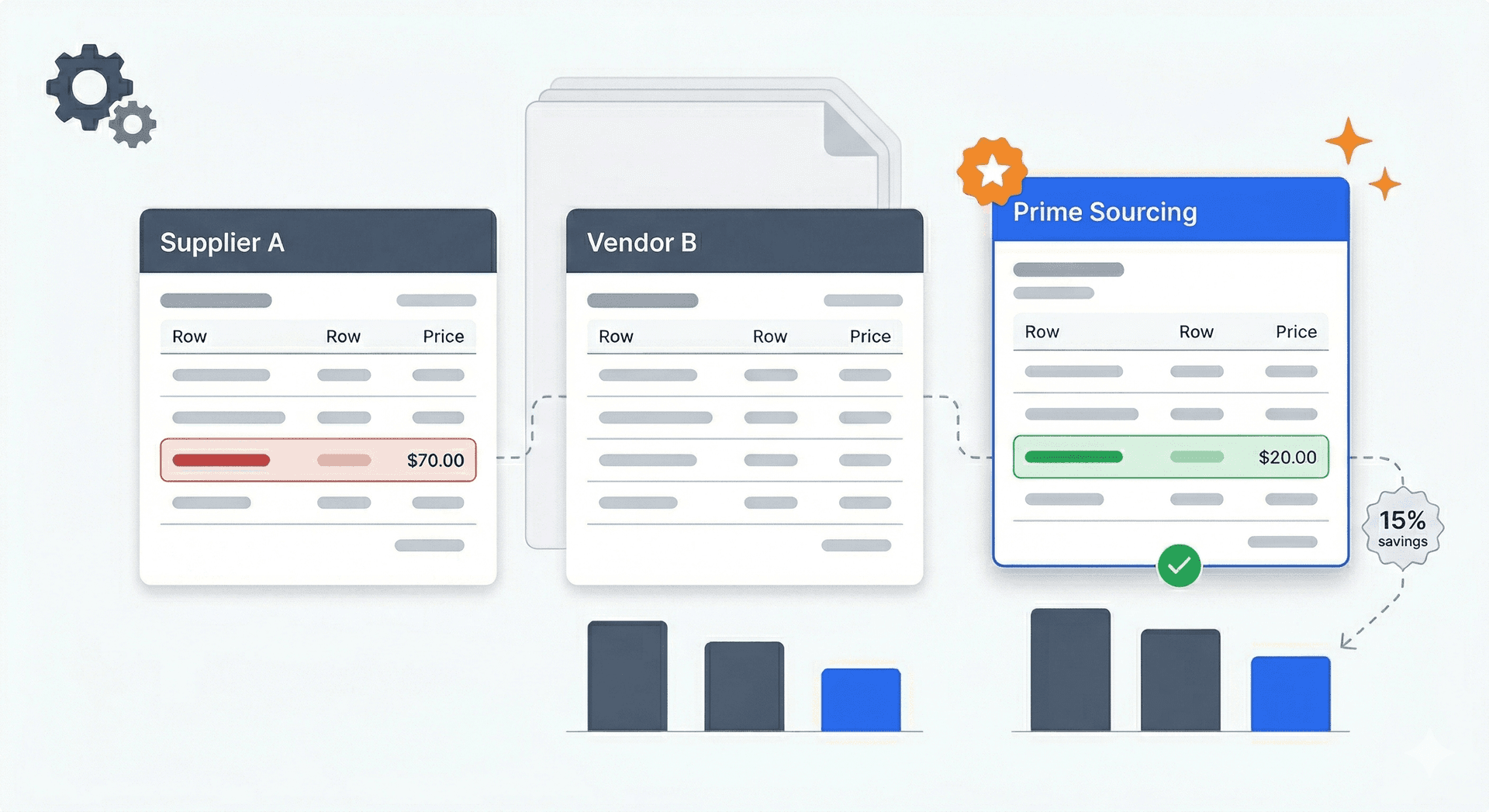
Automatic vendor comparison transforms the tedious process of evaluating multiple quotes from a spreadsheet exercise into a 2-minute workflow. Upload quotes from 2-5 vendors, and AI generates side-by-side analysis highlighting price differences, quantity variances, and terms.
The manual comparison problem:
| Manual Comparison Step | Time Required | Error Risk |
|---|---|---|
| Enter vendor 1 data into spreadsheet | 10-15 min | Data entry errors |
| Enter vendor 2 data | 10-15 min | Inconsistent formatting |
| Enter vendor 3 data | 10-15 min | Fatigue errors |
| Create comparison formulas | 5-10 min | Formula errors |
| Normalise units and currencies | 5-10 min | Conversion mistakes |
| Format for presentation | 5-10 min | — |
| Total | 45-75 min | Multiple risk points |
Automated comparison workflow:
- Upload quotes: Any format — PDF, Excel, photos
- AI extraction: All quotes processed in parallel (~60 sec each)
- Automatic comparison: Side-by-side view generated
- Variance highlighting: Price differences flagged automatically
- AI recommendation: Best-value vendor identified with reasoning
What automatic comparison reveals:
| Insight | Manual Process | Automated Process |
|---|---|---|
| Price per unit differences | Requires calculation | Instant highlight |
| Total cost variance | Manual formula | Automatic display |
| Hidden fee detection | Often missed | Flagged |
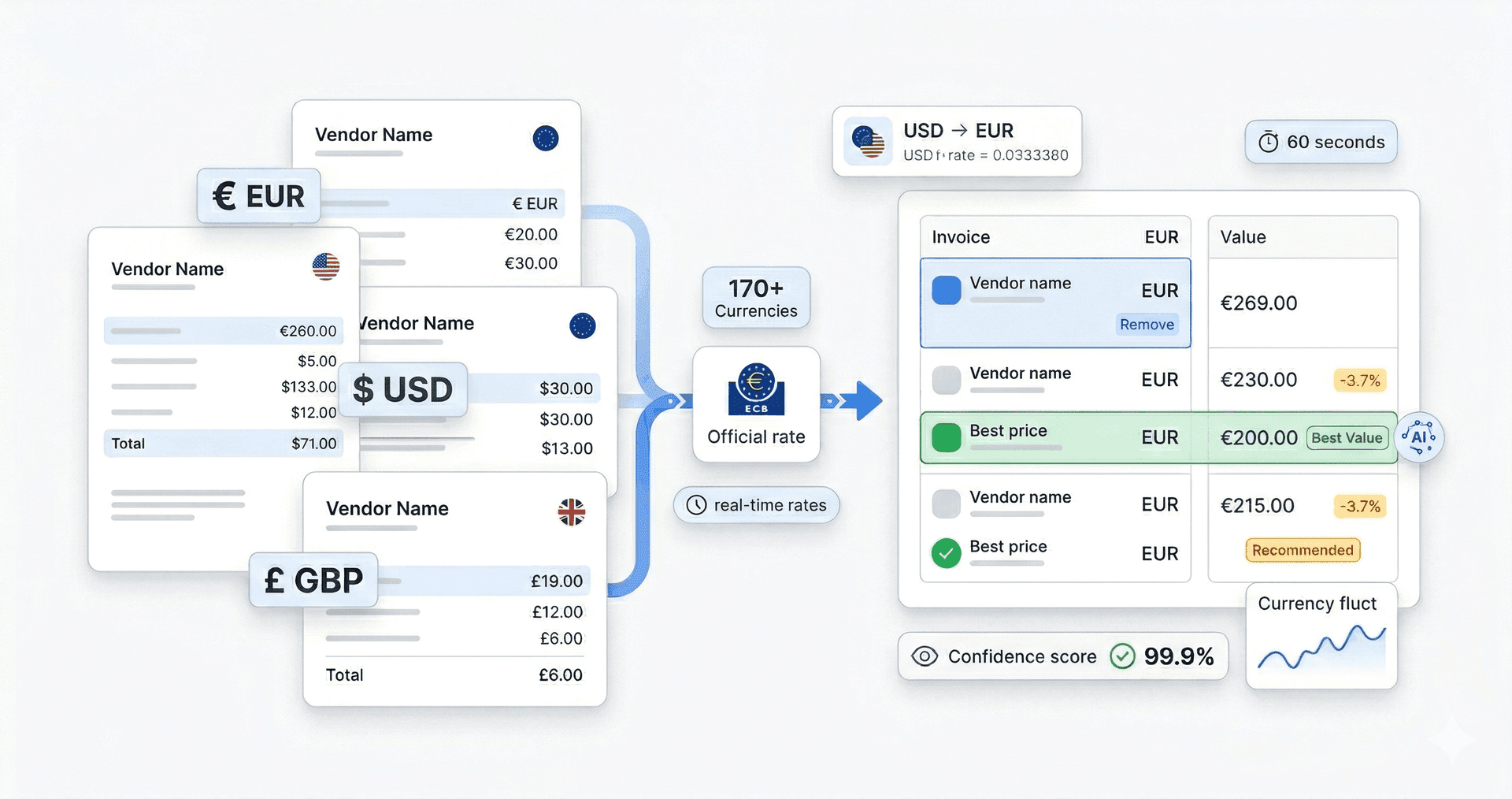
| Currency conversion | Manual lookup | Automatic (170+ currencies) |
| Terms comparison | Side-by-side reading | Structured comparison |
Example comparison output:
| Item | Vendor A | Vendor B | Vendor C | Variance |
|---|---|---|---|---|
| Steel Brackets (100 pcs) | $2,340 | $2,190 | $2,450 | $260 (11%) |
| Shipping | Included | $150 | $85 | Variable |
| Payment Terms | Net 30 | Net 15 | Net 45 | — |
| Total | $2,340 | $2,340 | $2,535 | — |
The AI would flag: "Vendor A and B have equivalent total cost, but Vendor A includes shipping with Net 30 terms. Vendor B requires faster payment (Net 15) with separate shipping. Recommended: Vendor A for better cash flow."
Multi-currency vendor comparison:
For businesses working with international suppliers, TRO Matcher supports 170+ currencies with automatic ECB rate conversion. A quote in EUR, GBP, and USD can be compared directly without manual currency lookup.
Related reading: See industry-specific comparison strategies in How Construction Companies Save 30% on Material Costs and Restaurant Owner's Guide to Supplier Cost Control.
Choosing the right AI invoice tool for your business
Not every business needs enterprise AP automation. For most SMBs, the right tool is one that handles extraction and comparison without IT involvement, integrates via simple CSV export, and costs less than the labour it saves.
Decision framework for SMBs:
| If You... | You Need... | TRO Matcher Fit |
|---|---|---|
| Process 10-50 invoices/month | Basic extraction + CSV export | FREE or PRO tier |
| Compare vendor quotes regularly | Extraction + comparison | PRO tier (with credits) |
| Need QuickBooks/Xero import | CSV export | Both plans |
| Have no IT/tech staff | No-code solution | Both plans |
| Work with international vendors | Multi-currency support | Both plans |
| Require audit trail | Full data export | Both plans (GDPR Art. 20) |
Feature comparison: SMB invoice tools
| Feature | TRO Matcher | Basic OCR Tools | Enterprise AP |
|---|---|---|---|
| Setup time | 5 minutes | 30-60 minutes | 3-6 months |
| Monthly cost | $0-19 | $20-100 | $500-5,000+ |
| Invoice extraction | AI (60 sec) | Template-based | Varies |
| Vendor comparison | Up to 5 quotes | Not included | Limited |
| AI recommendations | Yes | No | Sometimes |
| Multi-currency | 170+ | Limited | Usually |
| CSV export | One-click | Usually | Often restricted |
| Minimum company size | 1 person | Any | 50-100+ |
| IT involvement | None | Low | High |
When TRO Matcher is the right fit:
- Company size: 1-200 employees (optimised for 10-100)
- Monthly invoices: 10-500 (higher volumes supported)
- Finance team: None to small (no dedicated AP staff)
- Tech maturity: Comfortable with basic SaaS tools
- Integration needs: CSV export to existing software (not API-first)
- Budget: Wants to start free or under $50/month
When other tools might be better:
- Processing 1,000+ invoices monthly with complex approval workflows
- Requiring direct API integration with ERP systems
- Having dedicated AP team available for implementation
- Needing three-way PO matching as primary workflow
Pricing comparison for SMBs:
| Solution | Monthly Cost | Invoices Included | Comparison | Export |
|---|---|---|---|---|
| Manual (Excel) | $0 (but 4-8 hrs labour) | N/A | Manual | N/A |
| TRO Matcher FREE | $0 | 10 extractions, 5 comparisons (lifetime) | Yes | CSV/PDF |
| TRO Matcher PRO | $19 | 100 extractions, 20 comparisons/mo + credits | Yes | CSV/PDF |
| Basic OCR tools | $75-150 | Varies | No | Usually |
| Enterprise AP | $500-5,000+ | Unlimited | Limited | Restricted |
Implementation: from paper to automated in 5 minutes
Getting started with AI invoice processing requires no IT involvement, no software installation, and no training. Most businesses are processing their first invoice within 5 minutes of creating an account.
Quick-start implementation:
Minute 1-2: Create account
- Visit TRO Matcher registration
- Email and password only — no credit card for free tier
- Verify email
Minute 3: Upload first invoice
- Click Upload or drag-drop
- Any format works: PDF, photo, scan
- Multiple files supported
Minute 4: Review extraction
- AI processes in ~60 seconds
- Review highlighted fields
- Edit any errors (rare at 99.9% accuracy)
Minute 5: Export or compare
- Single invoice: Export to CSV
- Multiple invoices: Create comparison
- Download for QuickBooks/Xero import
That's it. No templates to configure, no fields to map, no IT tickets to file.
Batch processing for efficiency:
For businesses with accumulated invoices, batch upload processes multiple documents simultaneously:
- Select up to 10 invoices (Pro: 100 extractions/month + credits)
- Upload all at once
- AI extracts in parallel
- Review and export as batch CSV
Integration with existing workflow:
| Current Process | Integration Point | Benefit |
|---|---|---|
| Invoices arrive by email | Forward to TRO Matcher upload | No workflow change |
| Paper invoices | Photo with phone, upload | Digitizes backlog |
| Supplier portal downloads | Upload PDFs | Centralises data |
| Monthly bookkeeper review | Share CSV exports | Structured data |
| Quarterly vendor analysis | Use comparison feature | Data-driven negotiation |
Staff onboarding:
TRO Matcher is designed for people who process invoices as part of a larger role, not AP specialists. The interface requires no training — anyone comfortable with email attachments can use it.
For teams, multiple users can access the same account (Pro plan), with all extractions and comparisons visible to authorised users.
Real scenario: Sarah's wholesale distribution company
Sarah manages operations at a 12-person wholesale distributor in Birmingham. She handles purchasing, HR, customer complaints, and vendor relationships — invoices are just one of eight things competing for her attention.
Before automation:
- 60 invoices arrive monthly from 15 suppliers
- Sarah enters data into Excel during "quiet moments" (which don't exist)
- Invoices pile up; she batch-processes them the first week of each month
- Takes 2 full days. She misses a supplier's 3% price increase for three months.
- Cost: 16 hours monthly + £1,200 in undetected overcharges per quarter
After switching to AI processing:
- Invoices photographed on receipt, uploaded during delivery check-in
- AI extraction runs while she handles other tasks
- Reviews 60 invoices in 2.5 hours total (85% reduction)
- Catches a 4% price increase on packaging in month one
- Now has pricing data for supplier negotiations
"I used to dread the first week of every month. Now I upload the invoices on Monday morning, review the AI extraction over coffee, and I'm done before lunch."
The difference isn't just time — it's the shift from reactive catch-up to proactive vendor management.
Your first 10 invoices are free. Most users find their first discrepancy within a week. Start with invoices you've already "checked".
Common concerns (honest answers)
"What if the AI makes a mistake on an important invoice?"
It will, occasionally. That's why every extracted field shows a confidence score. High-confidence fields (99.9%) rarely need review. Low-confidence fields are flagged — you see exactly which items need your attention before anything gets exported. The difference from manual entry: mistakes are surfaced for review instead of flowing through silently.
"My vendors use weird invoice formats. Will this work?"
Probably. AI extraction handles varied layouts because it understands document context, not fixed field positions. We've seen handwritten invoices, multi-page quotes, invoices in 12 languages. That said, extremely poor image quality (blurry photos, faded faxes) can reduce accuracy. The confidence scoring tells you when extraction struggled.
"Is my invoice data safe being processed by AI?"
Your data is processed using Google Gemini AI for extraction only — it's not stored by Google, not used for training, and not shared. TRO Matcher uses AES-256 encryption at rest and TLS 1.2+ in transit. We're fully GDPR compliant including Article 20 data portability: you can export or delete everything at any time. We're a small company too — we built this for businesses like ours.
"What if I want to leave?"
Leave anytime. Export all your data in CSV or PDF format with one click. No export fees, no "please call to cancel," no retention tricks. Your data is portable by design because vendor lock-in is a pattern we hate as users ourselves.
ROI calculator: is AI invoice processing worth it?
For most SMBs, AI invoice processing pays for itself within the first month through time savings alone. Adding error reduction and identified savings, the ROI multiplies quickly.
Calculate your potential savings:
| Input | Your Number | Example |
|---|---|---|
| Monthly invoices processed | ___ | 50 |
| Minutes per invoice (manual) | ___ | 8 min |
| Your hourly cost (loaded) | ___ | $35/hr |
| Annual procurement spend | ___ | $200,000 |
Example calculation (50 invoices/month, $35/hr):
| Metric | Manual | Automated | Savings |
|---|---|---|---|
| Monthly processing time | 6.7 hrs | 0.8 hrs | 5.9 hrs |
| Monthly labour cost | $234 | $28 | $206/mo |
| Annual labour savings | — | — | $2,472/yr |
| Error rate | 2% | 0.1% | 1.9% reduction |
| Overpayments prevented (on $200K) | — | — | $3,800/yr |
| Total annual savings | — | — | $6,272 |
| TRO Matcher PRO cost | — | $228/yr | — |
| Net annual benefit | — | — | $6,044 |
| ROI | — | — | 26x |
Break-even analysis:
| TRO Matcher Plan | Monthly Cost | Break-even Point |
|---|---|---|
| FREE | $0 | Immediate (10 invoices—lifetime) |
| PRO ($19/mo) | $19 | ~5 invoices/month |
If you're processing more than 5 invoices monthly, the Pro plan saves money from day one. The free tier provides immediate value for testing the product.
Hidden ROI factors:
| Factor | Impact | Quantification |
|---|---|---|
| Vendor negotiation data | Better pricing leverage | Variable (typically 2-5% savings) |
| Audit readiness | Reduced accountant hours | $200-500/quarter |
| Missed discount recovery | Early-pay discounts captured | 1-2% of eligible invoices |
| Staff time reallocation | Higher-value work | Productivity gain |
Industry-specific ROI data:
- Wholesale/distribution: 85% reduction in processing time, £4,800+ recovered annually from caught discrepancies
- Construction: 15-30% material cost savings from systematic vendor comparison
- Manufacturing: 22% more pricing discrepancies identified vs. spot-checking
- Restaurant: 3-7% food cost reduction within 8-12 weeks
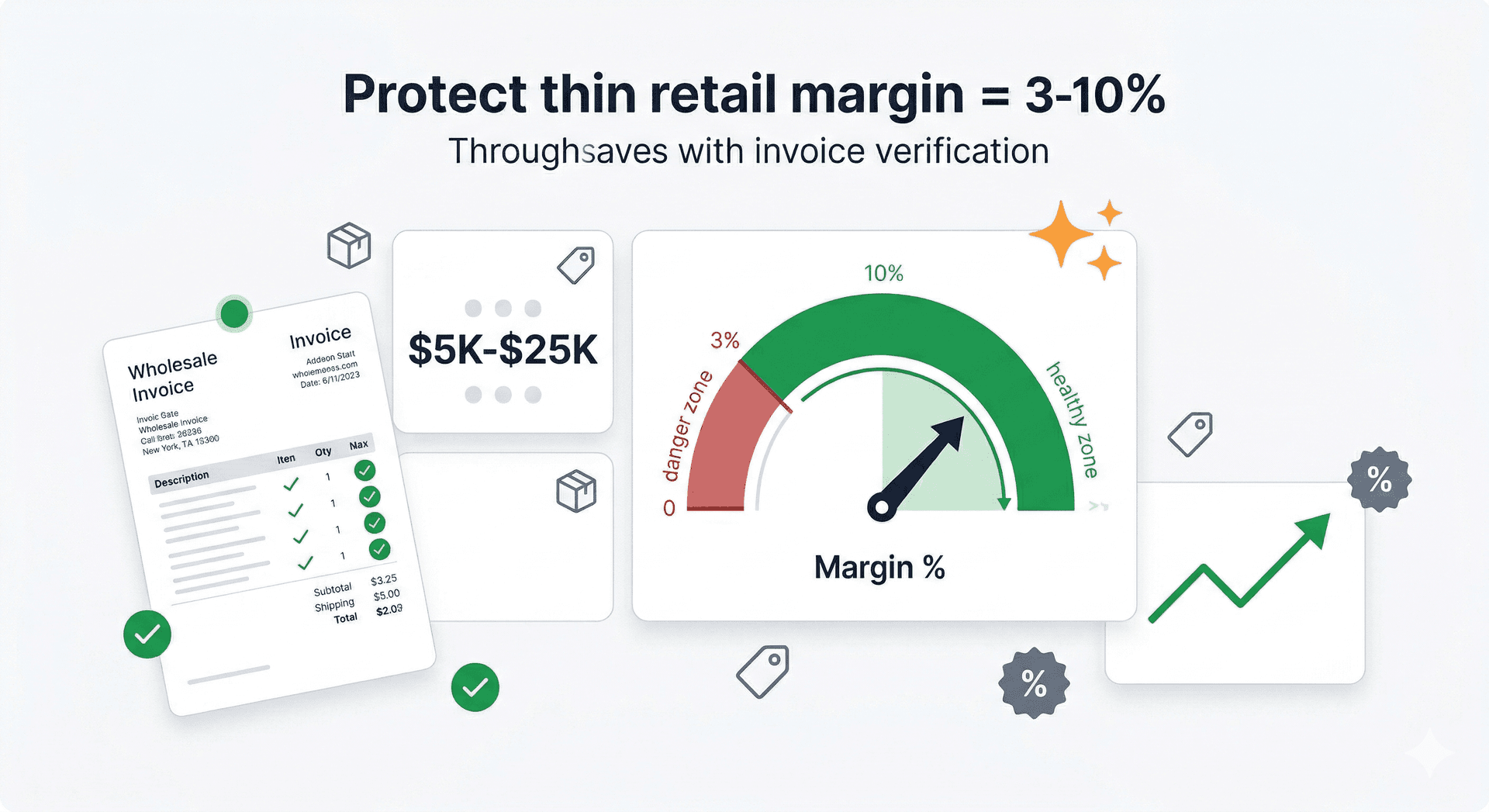
- Retail: 27% more discrepancies found with AI vs. manual
Frequently Asked Questions
What is the best AI invoice processing software for small business?
The best AI invoice processing software for small businesses combines data extraction, vendor comparison, and accounting software export in one tool. TRO Matcher extracts data from invoices in 60 seconds with 99.9% accuracy, compares up to 5 vendor quotes side-by-side with AI recommendations, and exports directly to CSV for QuickBooks, Xero, or Excel import. Starting at $0/month for 10 invoices with no credit card required, it's designed specifically for bookkeepers, accountants, and small business owners. Alternatives like Hubdoc ($20+/month with Xero), Dext ($34-100/month), and Autoentry ($24-72/month) focus primarily on extraction without comparison features.
How does AI invoice data extraction work?
AI invoice data extraction uses machine learning to read invoice documents (PDF, images, scans) and automatically identify fields like vendor name, invoice number, line items, quantities, unit prices, and totals. Unlike template-based OCR that requires configuration for each vendor format, AI extraction understands document context and handles any invoice layout automatically. TRO Matcher processes invoices in approximately 60 seconds with 99.9% accuracy, showing confidence scores on every field so you know exactly which items need review.
What is invoice digitization software and why do SMBs need it?
Invoice digitization software converts paper invoices, photos, and PDF scans into structured digital data that can be searched, analysed, and imported into accounting systems. SMBs need digitization because manual invoice data entry takes 5-10 minutes per invoice with a documented 1-4% error rate, while AI digitization completes in 60 seconds with near-zero errors. For businesses without dedicated AP staff — where the same person handles invoices, operations, and customer service — digitization eliminates the back-office bottleneck that causes invoice review to be deferred indefinitely.
How can I automate invoice data entry without coding?
To automate invoice data entry without coding, use an AI extraction tool like TRO Matcher. Simply upload invoices in any format (PDF, photo, Excel), and the AI automatically extracts all fields in 60 seconds. No API integration required, no templates to configure, no IT involvement needed. The extracted data exports as CSV for direct import into QuickBooks, Xero, FreshBooks, or any accounting software. The entire workflow requires only a web browser and takes under 5 minutes to set up.
How do I convert a PDF invoice to CSV using AI?
To convert a PDF invoice to CSV: 1) Upload the PDF to TRO Matcher (or snap a photo of a paper invoice), 2) AI extracts vendor details, line items, quantities, and prices in 60 seconds, 3) Review extracted data with confidence scores highlighting any uncertain fields, 4) Click Export to download CSV. The CSV is formatted for direct import into QuickBooks, Xero, FreshBooks, or Excel. No manual retyping required, no reformatting needed. Batch conversion handles multiple PDFs simultaneously.
Can I compare vendor quotes automatically?
Yes. TRO Matcher compares up to 5 vendor quotes automatically after AI extraction. Upload quotes in any format (PDF, photos, Excel), and the system generates side-by-side comparison highlighting price differences, quantity variances, and payment terms. AI-powered recommendations suggest the best-value vendor with reasoning you can review and override. Multi-currency support handles international vendors automatically with 170+ currencies via ECB exchange rates.
What file formats do AI invoice processing tools support?
TRO Matcher supports 8 invoice formats: PDF, PNG, JPEG, WebP, HEIC (iPhone photos), CSV, DOCX, and XLSX. Whether you receive invoices by email, photograph paper invoices with your phone, download from supplier portals, or receive Excel-format quotes, the AI processes them all with the same 99.9% accuracy. No format conversion or preprocessing required — upload directly and extraction begins immediately.
How accurate is AI invoice extraction compared to manual data entry?
AI invoice extraction achieves 99.9% accuracy with confidence scoring on every field, compared to manual data entry's documented 1-4% error rate (AP industry benchmarks). The difference compounds at scale: on 100 invoices monthly, manual entry introduces 1-4 errors requiring correction, while AI extraction flags uncertain fields for human review before errors become overpayments. The confidence scoring is the critical difference — you see which fields need attention instead of errors flowing through silently.
What is the ROI of AI invoice processing for small businesses?
SMBs typically see ROI within the first month. Based on 5-10 minutes saved per invoice and $25-45/hour labour costs, a business processing 50 invoices monthly saves $200-$375 in labour alone. Add 1-3% reduction in overpayments from eliminated data entry errors, and annual savings reach $5,000-$15,000 for businesses with $200K+ procurement spend. TRO Matcher starts at $0/month with 10 free invoice uploads, meaning the free tier delivers immediate value. Paid plans ($19-49/month) typically pay for themselves within the first 5-12 invoices processed.
Can I export AI-extracted invoice data to QuickBooks or Xero?
Yes. TRO Matcher exports extracted invoice data as CSV files formatted for direct import into QuickBooks, Xero, FreshBooks, Sage, and Excel. One-click export, no reformatting needed. PDF reports are also available for stakeholder sharing and record-keeping. The export is fully GDPR Article 20 compliant — your data is portable with no export fees or vendor lock-in. You can download all your invoices, comparisons, and extracted data at any time.
Sources and Methodology
This guide is based on:
- APQC: Accounts Payable Key Benchmarks 2024 — invoice processing costs ($12-$30 manual vs $1-$5 automated)
- Ardent Partners: State of ePayables 2024 — best-in-class performance data ($2.88 vs $12.88 per invoice)
- The Hackett Group: Procurement automation performance data — 76% faster processing, 55% lower cost
- IOFM: Accounts Payable Research 2024 — 39% of invoices contain errors, error rate benchmarks
- TRO Matcher Platform Data: Processing metrics across SMB users
- Industry standards: Labour cost benchmarks for AP/bookkeeping roles in US, UK, EU markets
Bottom Line
AI invoice processing transforms the most time-consuming back-office task for small businesses. By automating digitization, extraction, and comparison, SMBs reclaim 4+ hours weekly, eliminate 1-4% error rates, and gain systematic visibility into vendor pricing — without hiring additional staff or implementing enterprise software.
The maths is straightforward: manual invoice processing costs $200-400 monthly in labour for a 50-invoice business, plus thousands in undetected overpayments. AI processing costs $0-19 monthly and pays for itself within weeks.
"AI invoice processing for small business combines digitization, extraction, and comparison in one workflow. TRO Matcher processes invoices in 60 seconds with 99.9% accuracy, exports to CSV for QuickBooks and Xero, and starts free — eliminating the $28,500 annual productivity cost of manual data entry while reducing overpayments by 1-3%."
Ready to test it on your invoices? Start free with 10 extractions — no credit card required. Process your first invoice in under 60 seconds and export to CSV immediately.
Process Your First Invoice in 60 Seconds
Upload any invoice — PDF, photo, or scan — and watch AI extract every field automatically. Export to CSV for QuickBooks or Xero. Free to start, no credit card required.
Start Free