About TRO Invoice Matcher
What is TRO Invoice Matcher?
TRO Invoice Matcher is an AI-powered SaaS platform that helps small and medium businesses compare supplier invoices. It uses Google Gemini AI to automatically extract data from PDF, Excel, CSV, and Word documents, then displays invoices side-by-side so businesses can identify the best supplier deals and reduce procurement costs.
How does TRO Invoice Matcher work?
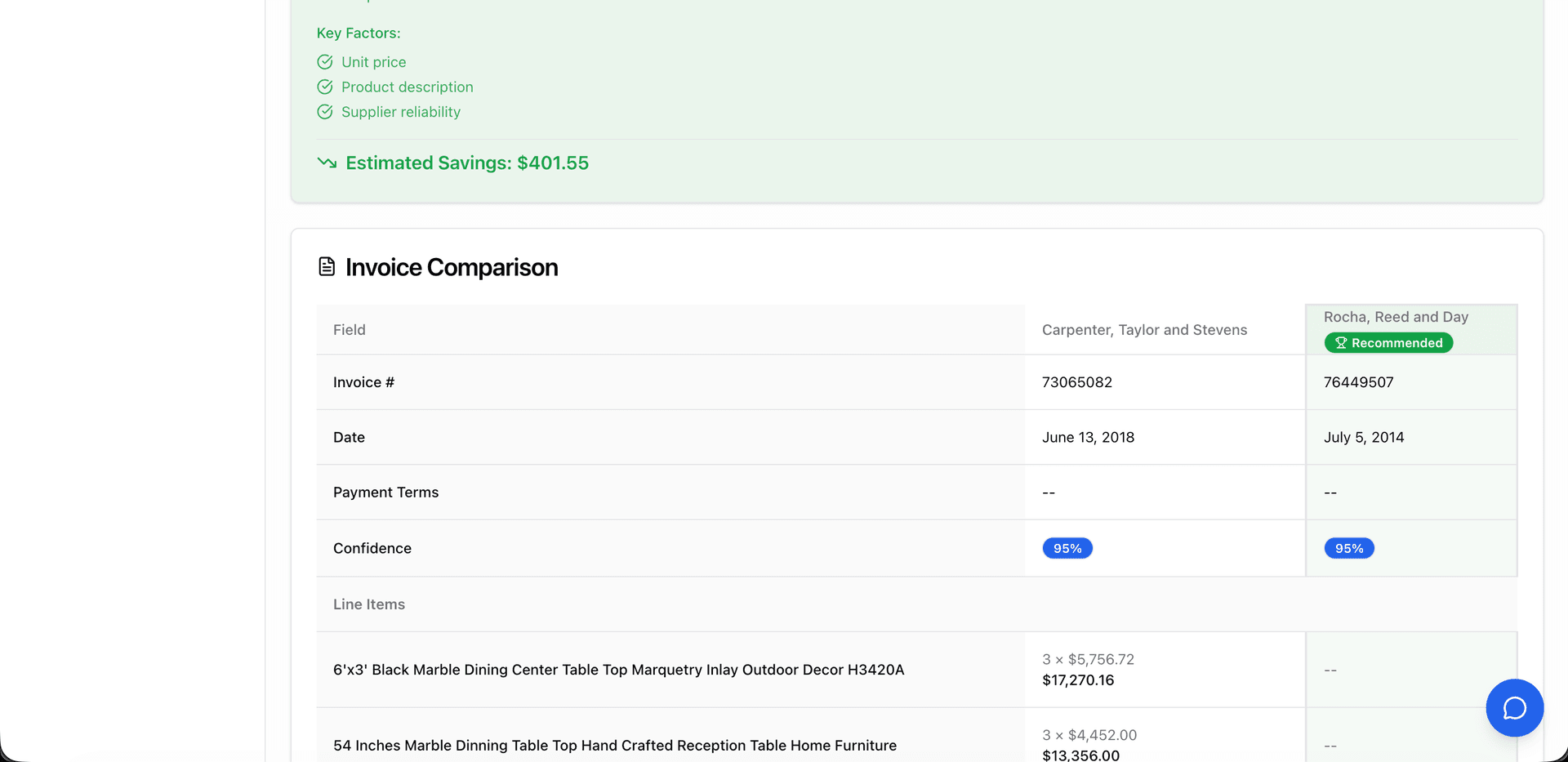
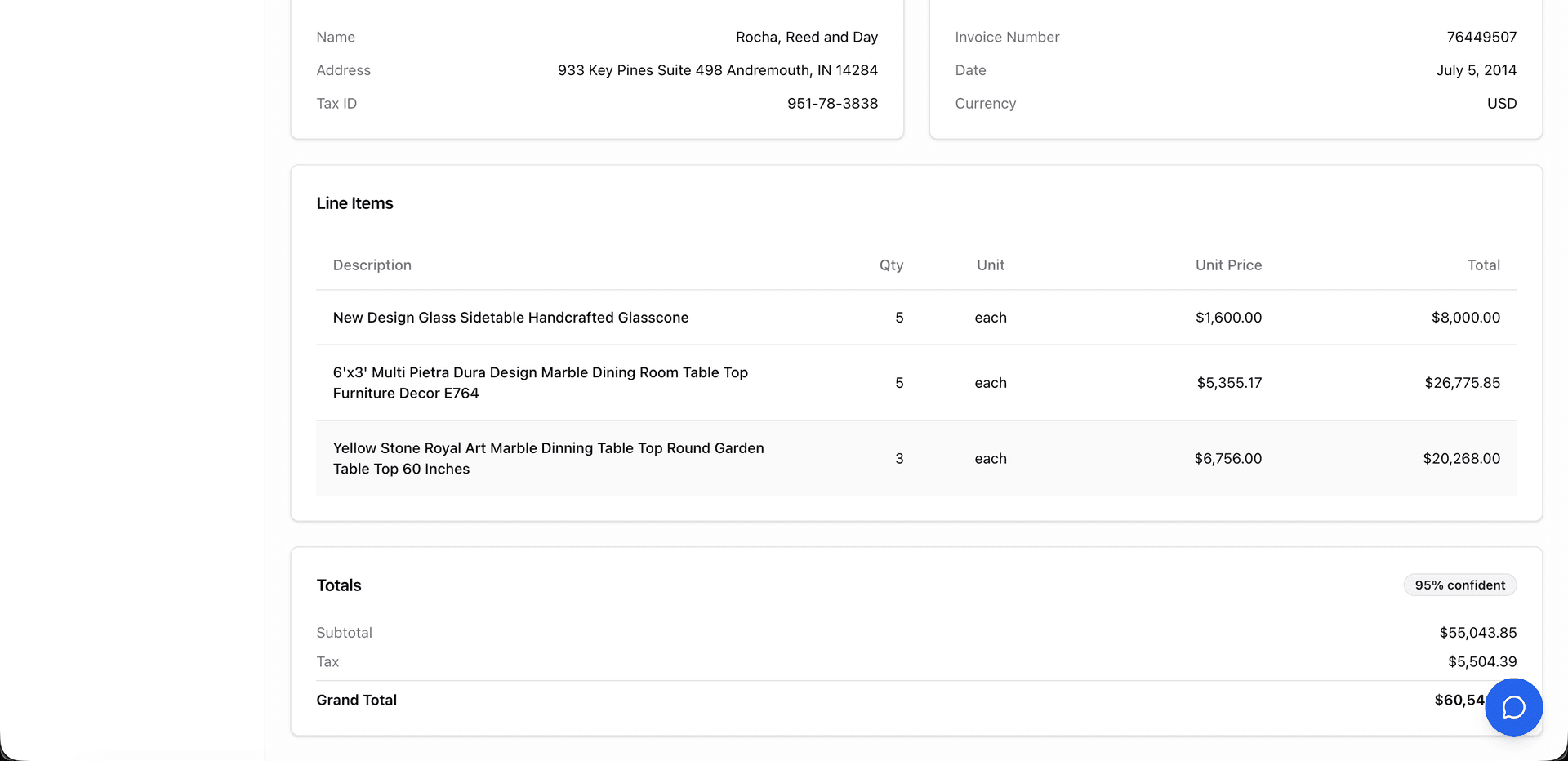
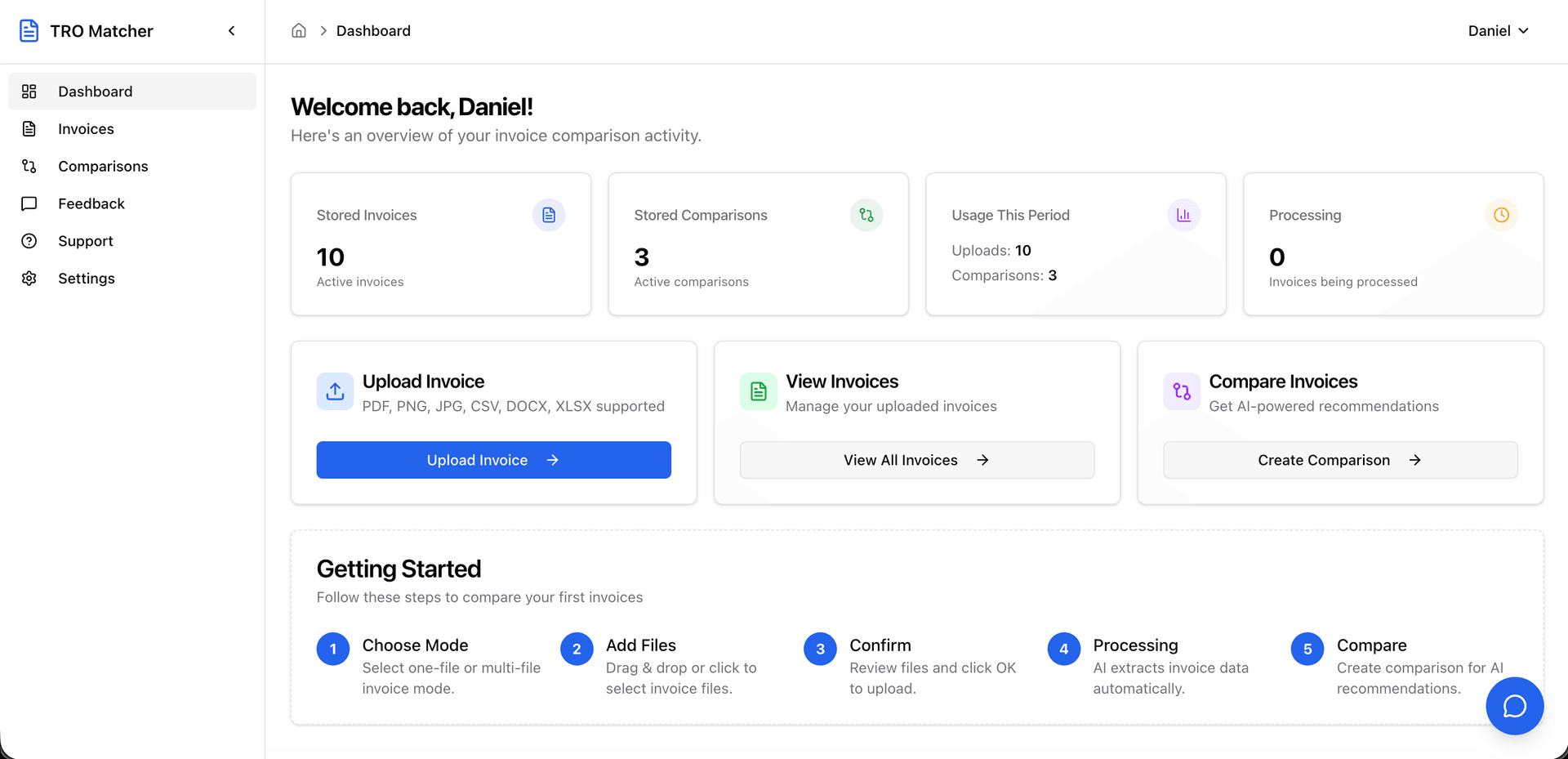
TRO Invoice Matcher works in three steps: (1) Upload invoices in any format (PDF, Excel, CSV, Word, or images), (2) AI automatically extracts and normalizes line items, prices, quantities, and vendor information with confidence scores for each field, (3) Review the extraction, then view side-by-side comparisons and receive AI-powered recommendations for the best deals.
How much does TRO Invoice Matcher cost?
TRO Invoice Matcher offers three plans: Free (5 comparisons, 10 uploads/month, no credit card required), Starter at $19/month (50 comparisons, 100 uploads, email support), and Pro at $49/month (unlimited usage, priority processing, 24/7 chat support). All plans include AI data extraction and PDF/CSV export.
What industries use TRO Invoice Matcher?
TRO Invoice Matcher is designed for SMBs across multiple industries including Retail, HORECA (Hotels, Restaurants, Catering), Construction, Manufacturing, and any business that regularly compares supplier invoices for procurement decisions.
Is TRO Invoice Matcher secure?
Yes, TRO Invoice Matcher is GDPR and CCPA compliant with enterprise-grade security. All data is encrypted in transit and at rest. Invoice data is never shared with third parties. Users can export or delete their data anytime from account settings, with self-service GDPR data portability built in.
How does the AI extraction work?
TRO Invoice Matcher uses Google Gemini AI to extract data from invoices with confidence scores displayed for every field. The AI handles various layouts, currencies, languages, and document types including scanned images. You always review extracted data before using it.
How does TRO Invoice Matcher compare to alternatives?
Unlike traditional AP automation tools that focus on matching invoices to purchase orders, TRO Invoice Matcher specializes in comparing quotes from different suppliers to find the best deals. It offers a free tier, requires no complex setup, and provides instant AI-powered recommendations.
What file formats does TRO Invoice Matcher support?
TRO Invoice Matcher supports PDF, Microsoft Excel (.xlsx, .xls), CSV, Microsoft Word (.docx), and image formats (PNG, JPEG, HEIC). It can also process scanned documents and photos of invoices.
What are the main features of TRO Invoice Matcher?
Key features include: AI-powered data extraction, side-by-side invoice comparison (up to 5 invoices), multi-format support, smart recommendations for best deals, PDF and CSV export, real-time processing, and GDPR & CCPA compliant data handling.
How do I extract data from a PDF invoice?
Upload any PDF invoice to TRO Invoice Matcher. Google Gemini AI extracts vendor name, line items, quantities, prices, and totals in 60 seconds with confidence scores for each field. Review the extraction, then export the structured data to CSV for QuickBooks, Xero, or any accounting software.
Can I convert an invoice to CSV?
Yes. TRO Invoice Matcher converts PDF invoices to CSV format in one click. Upload any invoice (PDF, image, Excel), AI extracts all data with confidence scoring, you review it, then export to CSV for import into QuickBooks, Xero, FreshBooks, or any spreadsheet software.
Is there a free invoice OCR tool?
Yes. TRO Invoice Matcher offers a free plan with 10 invoice uploads and 5 comparisons per month, no credit card required. It uses Google Gemini AI with confidence scoring for every extracted field. Paid plans start at $19/month for more volume and priority support.
How do I import invoices to QuickBooks?
TRO Invoice Matcher exports extracted invoice data to CSV format that imports directly into QuickBooks. Upload your supplier invoices, AI extracts the data in 60 seconds, then download CSV and import to QuickBooks. No retyping required.
Can I export all my data from TRO Invoice Matcher?
Yes. TRO Invoice Matcher provides self-service GDPR data export from your profile settings. Request a full export of all your data (invoices, comparisons, account info) in JSON or CSV format. Exports are ready within minutes and available for download for 7 days. This complies with GDPR Article 20 data portability requirements.
How much time does TRO Invoice Matcher save?
Users report saving 4+ hours weekly on invoice processing. Manual invoice comparison takes 15-20 minutes per invoice with a 1-4% data entry error rate. TRO Invoice Matcher processes invoices in 60 seconds with AI-powered confidence scoring, eliminating manual data entry errors and freeing up time for higher-value work.
How does TRO Invoice Matcher compare to Excel for invoice comparison?
Excel requires manual data entry (15-20 minutes per invoice, 1-4% error rate), no automated matching, and no AI recommendations. TRO Invoice Matcher extracts data in 60 seconds with confidence scores, automatically aligns line items across invoices, highlights price differences, and provides AI-powered vendor recommendations. For a business processing 20+ invoices monthly, the time savings pay for the tool in the first month.
Can I export extracted invoice data to QuickBooks?
Yes. TRO Invoice Matcher exports extracted invoice data to CSV format that imports directly into QuickBooks, Xero, FreshBooks, and other accounting software. Upload your invoice, AI extracts the data in 60 seconds with confidence scores, you review and approve, then download the CSV for direct import. No manual retyping required.
Does TRO Invoice Matcher support multi-currency invoice comparison?
Yes. TRO Invoice Matcher supports 170+ currencies with automatic conversion using real-time ECB exchange rates. When comparing invoices in different currencies, the system converts all amounts to a common currency for accurate side-by-side comparison, making it ideal for businesses working with international suppliers.
What features does TRO Invoice Matcher offer?
TRO Invoice Matcher offers six core features: (1) AI-Powered Data Extraction — snap a photo of any invoice (even dirty or crumpled) or upload PDF, Excel, CSV, Word files and get structured data in 60 seconds with confidence scoring, (2) Side-by-Side Invoice Comparison for up to 5 supplier invoices simultaneously, (3) Multi-Format Support for 8+ file types including smartphone photos and scanned documents, (4) Smart AI Recommendations identifying the best supplier deals, (5) Review & Verify with full control over extracted data before comparison, and (6) Export to PDF/CSV for professional reports and accounting software import.
How does AI invoice data extraction work?
TRO Invoice Matcher uses Google Gemini AI to digitize any invoice in under 60 seconds. Snap a photo of a paper invoice with your smartphone — even crumpled, stained, or poorly lit — and the AI extracts vendor name, address, line items, quantities, unit prices, totals, dates, and payment terms. You can also upload PDF, Excel, CSV, or Word files. Every extracted field includes a confidence score. Once digitized, you can save the structured data, download it as a PDF or CSV file, or compare it side-by-side with up to 4 other supplier invoices.
How does invoice comparison help save money?
Invoice comparison helps businesses save money by revealing price differences across suppliers that are invisible when reviewing invoices individually. TRO Invoice Matcher normalizes line items across up to 5 supplier invoices, highlights price variances, and calculates potential savings. Users report finding 5-15% cost reductions by switching suppliers for specific items. The AI-powered recommendations also factor in quantity discounts and payment terms to identify the true best deal.
What are AI-powered procurement recommendations?
AI-powered procurement recommendations analyze your compared invoices and suggest which supplier offers the best value for each line item. The AI considers unit price, total cost, quantity thresholds, payment terms, and delivery conditions. Each recommendation includes clear reasoning explaining why a particular supplier is recommended, giving procurement teams data-driven justification for vendor selection decisions.
What export formats does TRO Invoice Matcher support?
TRO Invoice Matcher supports two export formats: PDF for professional comparison reports with formatted tables, price highlights, and AI recommendations — ideal for management review and record-keeping. CSV export provides structured data that imports directly into QuickBooks, Xero, FreshBooks, and other accounting software. Both formats include all extracted data, comparison results, and supplier recommendations.
How accurate is TRO Matcher?
TRO Matcher achieves high accuracy for invoice data extraction using Google Gemini AI. Each extracted field includes a confidence score so you can quickly verify results. The AI handles various layouts, currencies, languages, and document types including scanned images and smartphone photos. You always review extracted data before using it for business decisions.
Can I export extracted data to QuickBooks?
Yes! TRO Matcher exports to CSV format which imports directly into QuickBooks, Xero, FreshBooks, and other accounting software. Upload your invoice, AI extracts the data in 60 seconds, you review it, then download CSV for direct import. PDF reports are also available for record-keeping and management review.
Is there a free plan available?
Yes, TRO Matcher offers a FREE tier with 10 invoice extractions and 5 comparisons per month. No credit card required to start. The free plan includes AI-powered data extraction, side-by-side comparison, and export to PDF or CSV. Paid plans starting at $19/month offer more volume and priority support.