

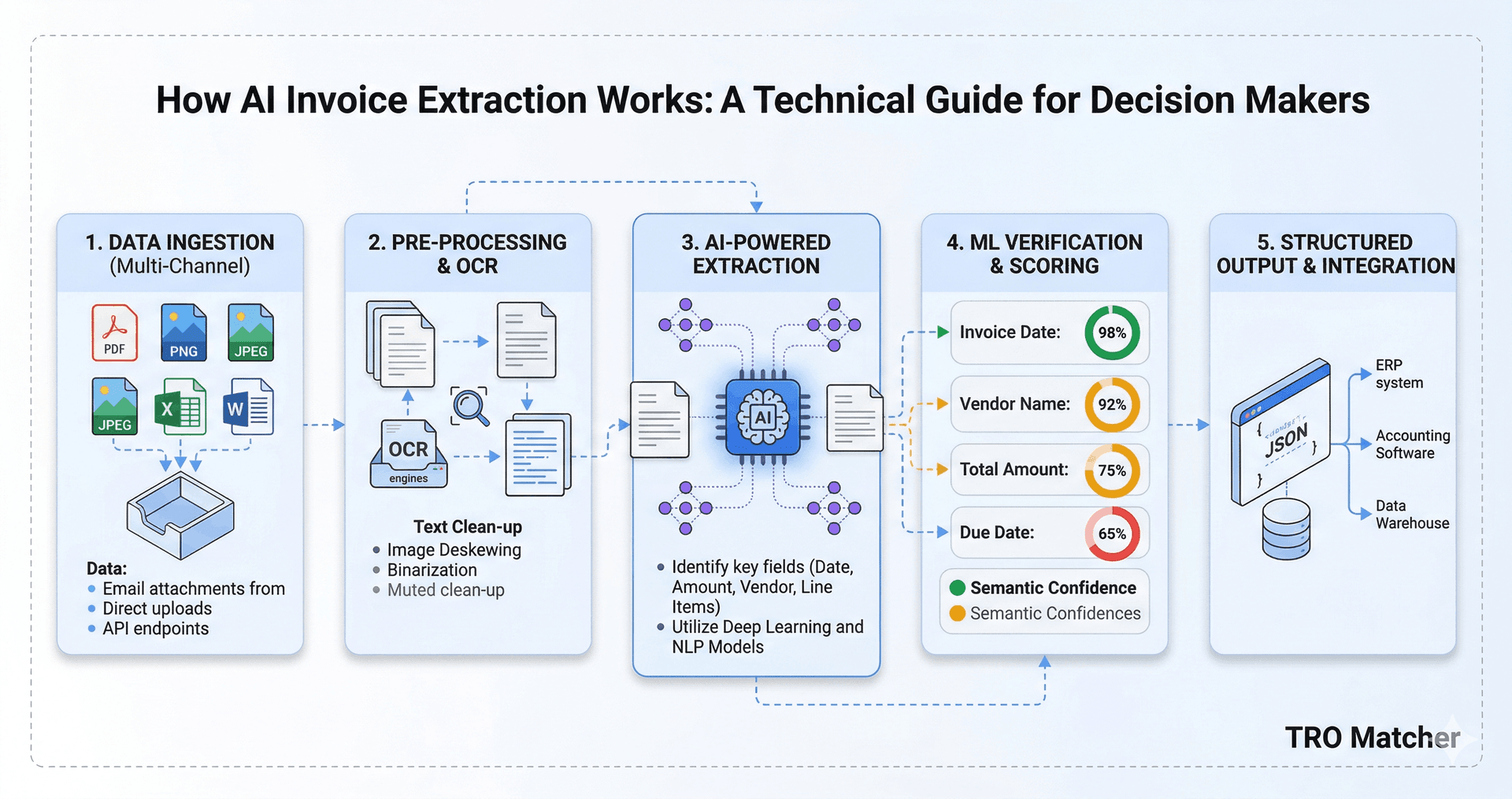
Quick Answer: AI invoice extraction uses large language models to read any invoice format and automatically extract vendor name, line items, quantities, prices, totals, and dates—achieving up to 99.9% accuracy in under 60 seconds. Unlike traditional OCR that requires templates for each vendor, AI understands document context and works with any layout. Confidence scores show which fields need human verification, so you review only uncertain extractions instead of every field.
Key Takeaways
- AI extraction uses large language models to understand document context—no templates needed
- Up to 99.9% accuracy is achievable with modern AI, eliminating most manual verification
- Confidence scores tell you which fields need human review—focus only on uncertain extractions
- 8 file formats supported: PDF, PNG, JPEG, WebP, HEIC, CSV, DOCX, XLSX
- Processing time: 60 seconds average vs 5-15 minutes manual entry per invoice
What is AI Invoice Extraction?
AI invoice extraction automatically reads invoices—whether paper scans, PDFs, or spreadsheets—and converts them into structured data you can use. Instead of a human typing vendor names, line items, and amounts into a system, AI does this in seconds.
Here's what modern AI extraction captures:
| Field Category | Extracted Data |
|---|---|
| Header Info | Vendor name, address, invoice number, date |
| Payment Terms | Due date, payment terms, bank details |
| Line Items | Product/service description, SKU, quantity, unit price |
| Totals | Subtotal, tax, shipping, discounts, total |
| Currency | Currency code, symbol recognition |
The difference: AI doesn't just see characters—it understands what they mean in context.
How Does OCR Differ from AI Extraction?
This is the most common source of confusion. Here's the technical difference:
Traditional OCR (Optical Character Recognition)
What it does: Converts image pixels to text characters.
How it works:
- Scans the document image
- Identifies character shapes (A, B, C, 1, 2, 3)
- Outputs raw text in reading order
Limitations:
- Outputs unstructured text (a wall of characters)
- Doesn't know "Invoice #12345" is an invoice number
- Requires templates to map text positions to fields
- New vendor = new template needed
- Poor handling of varied layouts
Example output:
Acme Corp 123 Main St Invoice 12345 Date 01/15/2026
Widget A 100 $5.00 $500.00 Widget B 50 $10.00 $500.00
Total $1000.00
AI Extraction (Large Language Models)
What it does: Understands document context to extract structured data.
How it works:
- Processes the document (image, PDF, or native file)
- Uses a large language model to understand layout
- Identifies fields by semantic meaning, not position
- Outputs structured data with confidence scores
Advantages:
- Works with any invoice layout automatically
- No template configuration needed
- Handles handwritten notes, stamps, annotations
- Self-improves with model updates
- Provides confidence scores for verification
Example output:
{
  "vendor": { "name": "Acme Corp", "confidence": 0.98 },
  "invoiceNumber": { "value": "12345", "confidence": 0.99 },
  "date": { "value": "2026-01-15", "confidence": 0.97 },
  "lineItems": [
    { "description": "Widget A", "quantity": 100, "unitPrice": 5.00, "confidence": 0.96 },
    { "description": "Widget B", "quantity": 50, "unitPrice": 10.00, "confidence": 0.95 }
  ],
  "total": { "value": 1000.00, "confidence": 0.99 }
}
What Are Confidence Scores and Why Do They Matter?
Confidence scores make AI extraction practical for business use.
How Confidence Scores Work
Every extracted field includes a score from 0-100% indicating the AI's certainty:
| Score Range | Meaning | Action |
|---|---|---|
| 95-100% | High confidence | Auto-accept |
| 80-94% | Medium confidence | Quick review |
| Below 80% | Low confidence | Verify against source |
Why Confidence Scores Matter
Without confidence scores (traditional OCR):
- Every field needs manual verification
- Time savings limited to ~50%
- Errors slip through on "assumed correct" fields
With confidence scores (AI extraction):
- Only review flagged fields (typically 5-10% of data)
- Time savings of 80-95%
- Focus human attention where it matters
Real-World Example
Invoice with 20 fields extracted:
- 17 fields at 95%+ confidence → auto-accept
- 2 fields at 85-94% confidence → quick glance
- 1 field at 72% confidence → verify against source
Time to review: 30 seconds instead of 5 minutes.
How Accurate is AI Invoice Extraction?
Accuracy depends on document quality and the AI model used:
Accuracy by Document Type
| Document Type | Typical Accuracy |
|---|---|
| Native PDF (text-based) | 99-99.9% |
| High-quality scan | 97-99% |
| Mobile phone photo | 95-98% |
| Faxed document | 90-95% |
| Handwritten invoice | 80-90% |
Factors Affecting Accuracy
Document quality:
- Resolution (300 DPI minimum recommended)
- Lighting (photos should be evenly lit)
- Orientation (AI corrects most skew)
Invoice complexity:
- Standard layouts: highest accuracy
- Multi-page invoices: handled well
- Tables within tables: may need review
Language and currency:
- English, German, French, Spanish: highest accuracy
- 30+ major currencies recognized
TRO Matcher uses Google Gemini AI, achieving up to 99.9% accuracy on clean documents with sub-60-second processing.
Step-by-Step: How AI Extraction Works
Here's the technical flow when you upload an invoice to TRO Matcher:
Step 1: Document Ingestion
- Upload: Drag-and-drop or file selection
- Format detection: PDF, image, or spreadsheet identified
- Preprocessing: Orientation correction, contrast enhancement
Step 2: AI Processing
- Model: Google Gemini (multimodal AI)
- Analysis: Visual understanding of document layout
- Extraction: Semantic field identification
- Scoring: Confidence calculation per field
Step 3: Data Structuring
- Field mapping: Extracted data to standard schema
- Validation: Cross-field consistency checks
- Currency detection: Symbol and code recognition
Step 4: Output
- Review interface: Side-by-side original and extracted data
- Edit capability: Correct any flagged fields
- Export options: CSV for accounting software, PDF reports
Total time: 30-90 seconds (average 60 seconds)
What File Formats Can AI Extract?
Modern AI extraction handles multiple input formats:
Fully Supported Formats
| Format | Extension | Common Source |
|---|---|---|
| Email attachments, downloads | ||
| PNG | .png | Screenshots, exports |
| JPEG | .jpg, .jpeg | Scanned documents |
| WebP | .webp | Modern web exports |
| HEIC | .heic | iPhone photos |
| CSV | .csv | Spreadsheet exports |
| Excel | .xlsx, .xls | Spreadsheet exports |
| Word | .docx | Document exports |
Best Practices by Format
PDF invoices (most common):
- Native PDFs with text layer: highest accuracy
- Scanned PDFs: need clean scan at 300+ DPI
- Password-protected: remove protection first
Photos/images:
- Flat, evenly lit surface
- All edges visible
- No shadows or glare
- Portrait orientation preferred
Spreadsheets:
- Column headers help field mapping
- Avoid merged cells
- Consistent formatting
AI Invoice Extraction vs. Manual Entry
Here's the complete comparison:
| Metric | Manual Entry | AI Extraction |
|---|---|---|
| Time per invoice | 5-15 minutes | 60 seconds |
| Accuracy | 96-99% | 95-99.9% |
| Cost per invoice | $12-20 | $0.49-2.36 |
| Scale | Linear with headcount | Unlimited |
| Availability | Business hours | 24/7 |
| Learning curve | Each employee trains | Use immediately |
| Error detection | Spot-check sampling | Confidence scoring |
When Manual Entry Still Makes Sense
- Highly specialized document types AI hasn't seen
- Handwritten notes requiring interpretation
- Documents with complex approval workflows embedded
- Languages not supported by the AI model
For standard business invoices, AI extraction is faster, cheaper, and more consistent.
Frequently Asked Questions
What does AI invoice extraction mean?
AI invoice extraction uses machine learning models to automatically read invoices and identify key fields like vendor name, invoice number, line items, quantities, prices, and totals. Unlike template-based OCR, AI understands document context and works with any invoice layout without prior configuration.
How accurate is AI invoice extraction compared to manual entry?
AI invoice extraction achieves 95-99.9% accuracy depending on document quality, compared to 96-99% for manual entry (1-4% human error rate). The key difference: AI provides confidence scores for each field, allowing humans to focus verification on uncertain extractions only.
What's the difference between OCR and AI extraction?
Traditional OCR converts images to text but doesn't understand document structure—it needs templates for each vendor format. AI extraction uses large language models to understand document context, extracting structured data from any invoice layout without templates.
What file formats can AI invoice extraction handle?
Modern AI extraction handles PDF documents (native and scanned), images (PNG, JPEG, WebP, HEIC), spreadsheets (Excel, CSV), and Word documents. TRO Matcher supports 8 formats: PDF, PNG, JPEG, WebP, HEIC, CSV, DOCX, and XLSX.
How long does AI invoice extraction take?
AI invoice extraction typically completes in 30-90 seconds per document, compared to 5-15 minutes for manual data entry. TRO Matcher averages 60 seconds per invoice, including field extraction and confidence scoring.
What are confidence scores in AI extraction?
Confidence scores indicate how certain the AI is about each extracted field, typically shown as percentages. High confidence (95%+) means the extraction is likely accurate. Low confidence flags fields for human review. This prioritizes verification effort on uncertain data only.
See AI Extraction in Action
Upload any invoice—PDF, photo, Excel—and watch AI extract every field in under 60 seconds. Confidence scores show exactly what to verify.
What you get:
- Up to 99.9% extraction accuracy
- 60-second processing time
- Confidence scores for every field
- 8 file formats supported
- Native push to Xero/Sage (PRO) or CSV export for QuickBooks
See the AI data extraction feature page for supported formats and a full walkthrough.
Try Free → — Upload your first invoice in 30 seconds