

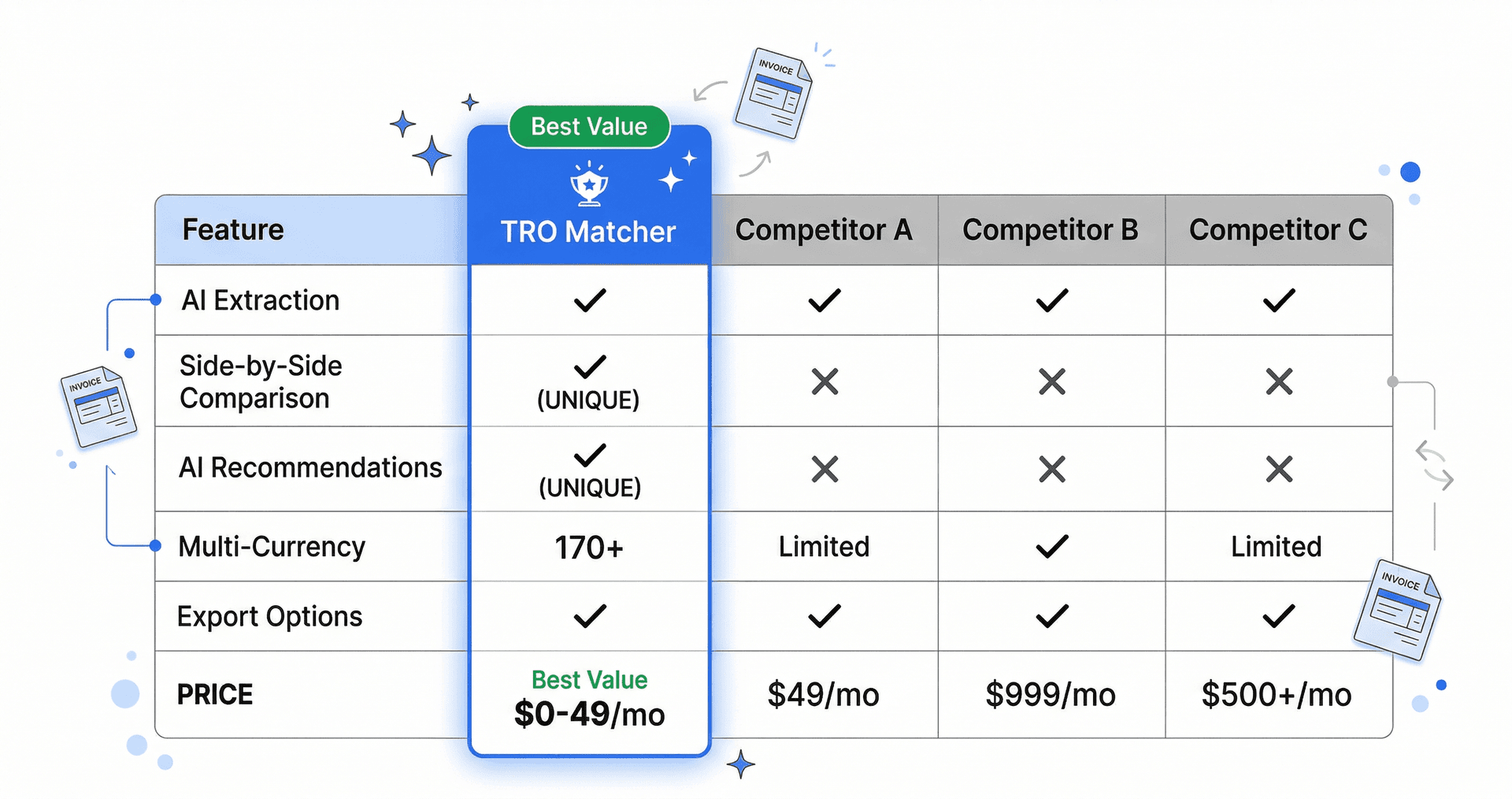
Quick Answer: The best invoice processing software for small businesses combines AI extraction with accounting software integration. TRO Matcher processes any invoice in 60 seconds with AI, pushes directly to Xero or Sage (PRO), exports CSV for QuickBooks and others, and includes vendor comparison features. Free tier available (10 extractions lifetime). Alternatives like Hubdoc, Dext, Autoentry, and Datamolino focus on extraction only. For bookkeepers, accountants, and small business owners, TRO Matcher offers the most complete solution.
Key Takeaways
- TRO Matcher processes any invoice in 60 seconds with AI extraction
- Native Xero/Sage push (PRO) or CSV export for QuickBooks and others
- Compare up to 5 vendor invoices side-by-side to find savings
- 170+ currencies supported with automatic ECB exchange rates
- Free tier available: 10 extractions and 5 comparisons (lifetime), no credit card required
- PRO: $19/month for 100 extractions, 20 comparisons + credits
What is Invoice Processing Software?
Invoice processing software automates the conversion of paper and digital invoices into structured data for your accounting system. The best solutions offer:
- AI Data Extraction: Reads invoice data from any format (PDF, photo, spreadsheet) in seconds
- Accounting Integration: Exports directly to QuickBooks, Xero, and other software
- Vendor Comparison: Optional side-by-side comparison to find savings
Most tools only handle extraction. TRO Matcher adds comparison features—helping you find the best vendor deals.
Who Needs Invoice Comparison Software?
| User Type | Use Case |
|---|---|
| Bookkeepers | Comparing vendor invoices for clients using QuickBooks/Xero |
| Accountants | Evaluating supplier costs across client portfolios |
| Small Business Owners | Finding the best deals from multiple suppliers |
| Spreadsheet Users | Replacing manual Excel comparisons with AI automation |
If you receive quotes from multiple vendors for the same or similar products, invoice comparison software saves hours and identifies savings invisible when reviewing invoices one-by-one.
Why Do SMBs Need Invoice Processing Software?
The Problem with Manual Data Entry
Most bookkeepers and small business owners process invoices manually:
- Receive invoice via email or paper
- Open PDF, manually type data into QuickBooks or Xero
- Double-check numbers for accuracy
- Repeat for every invoice
Time required: 15-20 minutes per invoice Error rate: 1-4% from manual typing Hidden costs: Reconciliation issues, audit problems, staff frustration
The AI-Powered Alternative
With TRO Matcher:
- Upload invoice (PDF, photo, or spreadsheet)
- AI extracts data in 60 seconds with confidence scoring
- Review extracted data (high-confidence fields highlighted)
- Export to QuickBooks or Xero with one click
- Optionally compare multiple vendor invoices
Time required: 1-2 minutes per invoice Error rate: <0.1% with confidence scoring Added value: Compare vendors to find savings
Evaluation Checklist
When evaluating invoice processing tools, check these features:
Must-Have Features
| Feature | Why It Matters |
|---|---|
| AI Data Extraction | Eliminates 15-20 min manual entry per invoice |
| QuickBooks/Xero Export | Direct integration with your accounting software |
| Multi-Format Support | PDF, photos, Excel, CSV from any source |
| Confidence Scoring | Know which extractions need review |
| CSV/PDF Export | Flexible output formats |
Nice-to-Have Features
| Feature | Why It Matters |
|---|---|
| Vendor Comparison | Compare multiple invoices side-by-side |
| AI Recommendations | Data-driven vendor selection |
| Multi-Currency | International vendor support |
| Free Tier | Try before you buy |
Red Flags to Avoid
- Per-user pricing: Costs balloon as team grows
- Annual contracts required: Can't test properly
- No accounting integration: Manual export defeats the purpose
- Limited format support: Should handle photos, PDFs, and spreadsheets
Invoice Processing Software Comparison
Feature Matrix
| Tool | Price | AI Extraction | Accounting Integration | Vendor Comparison | Multi-Currency |
|---|---|---|---|---|---|
| TRO Matcher | $0-19/mo | ✅ | ✅ Native Xero/Sage (PRO) | ✅ (up to 5) | ✅ (170+) |
| Hubdoc | $20/mo (with Xero) | ✅ | ✅ (Xero) | ❌ | ✅ |
| Dext | $34-100/mo | ✅ | ✅ | ❌ | ✅ |
| Autoentry | $24-72/mo | ✅ | ✅ | ❌ | ✅ |
| Datamolino | $20-50/mo | ✅ | ✅ | ❌ | ✅ |
| Tofu | $29-99/mo | ✅ | ✅ | ❌ | ✅ |
| Excel/Sheets | $0-20/mo | ❌ (manual) | ❌ (manual) | ❌ (manual) | ❌ (manual) |
Key insight: TRO Matcher is the only SMB tool combining extraction with vendor comparison.
Individual Tool Reviews
TRO Matcher — Best Overall for SMBs
Price: Free (10 extractions, 5 comparisons—lifetime) | $19/mo Pro (100 extractions, 20 comparisons/month + credits)
What it does: AI-powered invoice extraction + native Xero/Sage integration (PRO) or CSV export + vendor comparison. Process any invoice format in 60 seconds.
Pros:
- 60-second AI extraction from any format
- Native Xero/Sage push (PRO) with one click
- CSV export for QuickBooks, FreshBooks, and others
- Vendor comparison feature (unique at this price)
- 170+ currencies with daily ECB rates
- Free tier for testing
- No per-user pricing
Cons:
- No direct payment processing
- Newer product (launched 2026)
Best for: Bookkeepers, accountants, and small business owners processing invoices for Xero, Sage, or QuickBooks.
Verdict: ⭐⭐⭐⭐⭐ Best value for SMB invoice processing with comparison features.
Hubdoc — Xero's Document Capture
Price: Included with Xero ($20+/mo) or standalone
What it does: Document capture and data extraction integrated with Xero. Popular with bookkeepers managing multiple clients.
Pros:
- Deep Xero integration
- Automatic bank statement fetching
- Multi-client support for accountants
- Included with Xero subscription
Cons:
- No side-by-side invoice comparison
- No AI vendor recommendations
- Limited outside Xero ecosystem
- Designed for capture, not comparison
Best for: Bookkeepers and accountants already using Xero.
Verdict: ⭐⭐⭐⭐ Great for Xero users needing document capture, but lacks comparison features.
Dext (formerly Receipt Bank) — Receipt & Invoice Capture
Price: $34-100/month
What it does: AI-powered receipt and invoice capture for bookkeepers and accountants. Strong accounting integrations.
Pros:
- Up to 99.9% extraction accuracy
- Integrates with QuickBooks and Xero
- Mobile app for receipt capture
- Multi-client support for accountants
Cons:
- No invoice comparison features
- No AI vendor recommendations
- Document limits on lower plans
- Designed for bookkeeping, not procurement
Best for: Accountants and bookkeepers needing receipt capture for clients.
Verdict: ⭐⭐⭐⭐ Great for receipt capture, but doesn't solve vendor comparison needs.
Autoentry — Receipt Scanning for Accountants
Price: $24-72/month
What it does: Automated data entry for receipts and invoices, popular with UK accountants and bookkeepers.
Pros:
- Strong OCR accuracy
- QuickBooks and Xero integration
- Bank statement processing
- Accountant-focused features
Cons:
- No vendor comparison
- No AI recommendations
- UK-focused product
- No multi-vendor analysis
Best for: UK bookkeepers processing client receipts and invoices.
Verdict: ⭐⭐⭐ Solid extraction for accountants, but no comparison capabilities.
Datamolino — Invoice Data Extraction
Price: $20-50/month
What it does: AI-powered invoice and receipt data extraction with accounting software integration.
Pros:
- Good extraction accuracy
- QuickBooks/Xero/Sage integration
- Reasonable pricing
- Simple interface
Cons:
- No side-by-side comparison
- No AI vendor recommendations
- Limited to extraction only
- Smaller user base
Best for: Small businesses needing basic invoice data extraction.
Verdict: ⭐⭐⭐ Affordable extraction, but lacks comparison features.
Tofu — Modern Invoice Capture
Price: $29-99/month
What it does: Invoice capture and data extraction with modern UI and accounting integrations.
Pros:
- Clean, modern interface
- Good extraction accuracy
- QuickBooks/Xero integration
- Mobile-friendly
Cons:
- No comparison features
- No AI vendor recommendations
- Newer product
- Limited advanced features
Best for: Small businesses wanting modern invoice capture.
Verdict: ⭐⭐⭐ Good UI and extraction, but no vendor comparison capabilities.
Excel/Google Sheets — The DIY Approach
Price: Free - $20/month
What it does: Whatever you manually build.
Pros:
- Flexible
- Familiar
- Low cost
Cons:
- Manual data entry (15-20 min per invoice)
- 1-4% error rate from typing
- No automatic line item matching
- No AI recommendations
- Scale = more hours, more errors
Best for: Businesses with 1-2 invoices total or lots of free time.
Verdict: ⭐⭐ False economy—the time cost exceeds TRO Matcher's subscription quickly.
Pricing Comparison
| Tool | Monthly Cost | Cost Per Comparison* |
|---|---|---|
| TRO Matcher Free | $0 | 5 comparisons (lifetime) |
| TRO Matcher Pro | $19 | $0.95 (20 comparisons/month) |
| Excel/Sheets (manual) | $0-20 | $12-20 labor cost |
| Hubdoc | $20+ (with Xero) | N/A (no comparison) |
| Autoentry | $24-72 | N/A (no comparison) |
| Datamolino | $20-50 | N/A (no comparison) |
| Dext | $34-100 | N/A (no comparison) |
| Tofu | $29-99 | N/A (no comparison) |
*Based on 20 comparisons/month for active SMB. Credits available for additional usage.
The math is clear: TRO Matcher Pro at $19/month with credits for additional usage is the most cost-effective solution—and the only SMB tool with actual comparison features.
Who Should Use Each Tool?
| Your Situation | Best Tool |
|---|---|
| SMB comparing vendor quotes regularly | TRO Matcher |
| Bookkeeper using Xero | Hubdoc or Dext |
| Accountant capturing client receipts | Dext or Autoentry |
| Small business basic extraction | Datamolino or Tofu |
| Currently using spreadsheets | TRO Matcher (replaces manual work) |
| International vendors, need multi-currency | TRO Matcher |
| Want to try before buying | TRO Matcher Free |
Frequently Asked Questions
What is the best invoice processing software for small businesses?
For SMBs, the best invoice processing software combines AI extraction (60-second processing), accounting integration (QuickBooks/Xero export), and confidence scoring. TRO Matcher offers all three at SMB pricing (Free or $19/month PRO), plus unique vendor comparison features.
What should I look for in invoice processing software?
Key features: (1) AI-powered extraction with confidence scoring, (2) QuickBooks/Xero integration, (3) multi-format support (PDF, photos, spreadsheets), (4) multi-currency handling, (5) CSV/PDF export. Optional: vendor comparison for finding savings.
How much does invoice processing software cost?
SMB tools like Hubdoc ($20+ with Xero), Dext ($34-100/mo), Autoentry ($24-72/mo), and Datamolino ($20-50/mo) offer extraction. TRO Matcher offers extraction + comparison with FREE (10 extractions lifetime) or PRO at $19/month (100 extractions/month + credits).
Is TRO Matcher better than manual data entry?
Yes. Manual entry takes 15-20 min per invoice with 1-4% error rate. TRO Matcher extracts in 60 seconds with confidence scoring, then exports directly to QuickBooks or Xero.
Can TRO Matcher process invoices in different currencies?
Yes. TRO Matcher supports 170+ currencies with automatic daily ECB exchange rate conversion. Prices are normalized to your base currency.
Does TRO Matcher work with QuickBooks and Xero?
Yes. TRO Matcher exports to CSV format that imports directly into QuickBooks and Xero. No reformatting needed.
Stop Typing Invoice Data Manually
Process any invoice in 60 seconds with AI. Export directly to QuickBooks or Xero. Compare vendors to find savings.
Start with the free tier:
- 10 extractions (lifetime)
- 5 comparisons (lifetime)
- QuickBooks/Xero export
- No credit card required
Upgrade when you need more:
- Pro ($19/mo): 100 extractions, 20 comparisons/month + credits
Start Free → — Process your first invoice in 60 seconds