

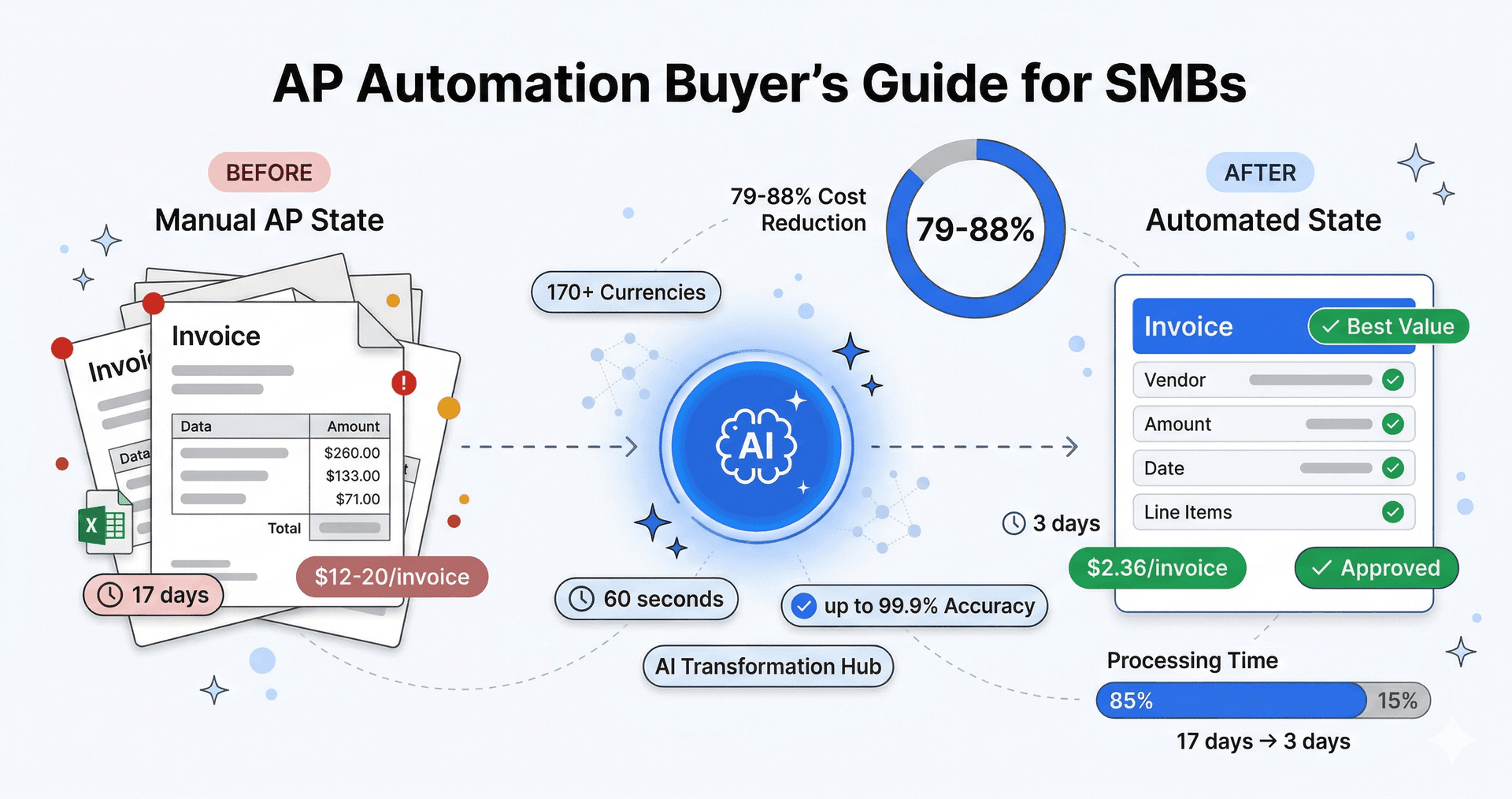
Quick Answer: AP automation software digitizes and streamlines invoice processing. For bookkeepers, accountants, and small business owners, the key is finding tools that integrate with QuickBooks and Xero. Manual invoice processing costs $12-20 per invoice with 1-4% error rates. AI-powered tools like TRO Matcher reduce this to $2.36 per invoice with near-zero errors. Start free with 10 extractions and 5 comparisons (lifetime limits)—no credit card required.
Key Takeaways
- Manual invoice processing costs $12-20 per invoice vs $2.36 with automation—79-88% cost reduction
- AI extraction with confidence scoring is the most impactful feature for reducing manual work
- QuickBooks/Xero integration is essential—export directly to your accounting software
- Free tier exists: TRO Matcher offers 10 extractions and 5 comparisons (lifetime limits) at $0
- ROI payback for most SMBs is 2-4 months after implementation
What is AP Automation?
AP automation (accounts payable automation) uses software to digitize and streamline the entire invoice-to-payment workflow. Instead of manually entering invoice data, routing paper for approval, and tracking payment status in spreadsheets, AP automation handles these tasks digitally with varying degrees of AI assistance.
Modern AP automation typically includes:
- Invoice Capture: Converting paper/PDF invoices to digital data
- Data Extraction: Pulling vendor info, line items, amounts, and dates
- Validation & Matching: Comparing against purchase orders and goods receipts
- Approval Routing: Sending to appropriate approvers based on rules
- Payment Preparation: Integrating with banking or payment systems
- Reporting: Analytics on spending, vendors, and processing times
For SMBs, the question isn't whether to automate—it's how much automation you actually need and what you should pay for it.
Why Do SMBs Need AP Automation?
The manual alternative is more expensive than most businesses realize:
The True Cost of Manual Processing
| Metric | Manual Process | With AP Automation |
|---|---|---|
| Cost per invoice | $12.88-$19.83 | $2.36 |
| Processing time | 17.4 days average | 3.1 days |
| Error rate | 1-4% | <0.1% |
| Late payment penalties | Common | Rare |
| Staff time per invoice | 15-20 minutes | 2-3 minutes |
Sources: IOFM (opens in new tab), APQC (opens in new tab), AP industry benchmarks
What This Means for Your Business
A business processing 100 invoices monthly:
- Manual: 100 × $15 = $1,500/month in processing costs
- With TRO Matcher Pro ($19/mo): 100 × $2.36 = $236/month + $19 subscription = $255/month
- Monthly savings: $1,215 (81% reduction)
Beyond direct costs, AP automation eliminates:
- Duplicate payments (2% of invoices at average companies)
- Early payment discount misses (2% off for paying in 10 days vs 30)
- Vendor relationship friction from payment delays
- Audit preparation time (paper trail vs digital records)
How Much Does Invoice Processing Software Cost?
Here's what bookkeepers, accountants, and small business owners should expect to pay:
Invoice Processing Tools for SMBs
| Vendor | Price | Focus | Best For |
|---|---|---|---|
| TRO Matcher | Free or $19/mo | Extraction + Comparison | SMBs comparing vendors |
| Hubdoc | $20+/mo (with Xero) | Document capture | Xero users |
| Dext | $34-100/mo | Receipt capture | Accountants |
| Autoentry | $24-72/mo | Invoice capture | UK accountants |
| Datamolino | $20-50/mo | Data extraction | Basic extraction |
| Tofu | $29-99/mo | Invoice capture | Modern UI |
What to look for: AI extraction, QuickBooks/Xero export, multi-format support (PDF, photos, spreadsheets).
What to avoid: Per-user pricing that scales poorly, annual contracts, features you don't need.
What Features Should SMBs Prioritize?
Not all AP automation features deliver equal value. Here's what matters most:
Must-Have Features
-
AI-Powered Data Extraction
- Extracts vendor name, invoice number, line items, amounts, dates
- Works with PDF, Excel, images, and scanned documents
- Shows confidence scores so you know what to verify
- TRO Matcher: Up to 99.9% accuracy with Gemini AI
-
Multi-Format Support
- PDF invoices (most common)
- Excel and CSV exports from vendor systems
- Images/photos of paper invoices
- TRO Matcher: 8 formats (PDF, PNG, JPEG, WebP, HEIC, CSV, DOCX, XLSX)
-
Export to Accounting Software
- Native push to Xero or Sage (PRO feature)
- CSV export for QuickBooks, FreshBooks, and others
- Formatted for direct import without reformatting
- TRO Matcher: Native Xero/Sage integration (PRO) or one-click CSV export (all plans)
-
Vendor Comparison (unique to TRO Matcher)
- Side-by-side comparison of up to 5 invoices
- Automatic line item matching across vendors
- Price difference highlighting
- AI-powered recommendations
Nice-to-Have Features
-
Multi-Currency Support
- Automatic currency conversion
- Daily ECB exchange rates
- TRO Matcher: 30+ major currencies
-
Approval Workflows
- Routing based on amount thresholds
- Email notifications for approvers
- Audit trail of approvals
-
3-Way Matching
- Invoice ↔ Purchase Order ↔ Goods Receipt
- Variance detection and alerts
- (Coming soon to TRO Matcher)
Enterprise Features Most SMBs Don't Need
- Supplier portal for invoice submission
- Complex multi-level approval matrices
- Direct ERP integration (enterprise systems)
- Payment processing and bank integration
- Vendor onboarding workflows
- Budget management integration
How to Choose the Right AP Automation for Your Business
Step 1: Calculate Your Current Costs
Quick formula:
Monthly AP cost = (Invoices/month × Minutes per invoice / 60) × Hourly labor rate
Example: 50 invoices × 15 minutes ÷ 60 × $30/hour = $375/month
Step 2: Identify Your Pain Points
| Pain Point | Feature Needed |
|---|---|
| Manual data entry taking hours | AI extraction |
| Can't compare vendor quotes easily | Side-by-side comparison |
| Errors from retyping | Confidence scoring |
| International vendors | Multi-currency |
| Export to QuickBooks/Xero/Sage | Native push (PRO) or CSV export |
Step 3: Match Features to Budget
| Budget | Best Option |
|---|---|
| $0 | TRO Matcher Free (10 extractions, 5 comparisons—lifetime limits) |
| $19/month | TRO Matcher Pro (100 extractions, 20 comparisons/month + credits) |
| $20-50/month | Hubdoc, Datamolino, or Autoentry for extraction only |
| $34-100/month | Dext if you need multi-client support for accounting practice |
Step 4: Run a Pilot
Before committing to annual contracts or implementation projects:
- Start with a free trial (TRO Matcher has a permanent free tier)
- Process 10-20 real invoices
- Time the workflow: upload → extraction → review → export
- Calculate actual time savings
- Only upgrade when you've validated the ROI
TRO Matcher vs. Alternatives
Here's how TRO Matcher compares to other invoice processing tools:
| Feature | TRO Matcher | Hubdoc | Dext | Autoentry | Datamolino |
|---|---|---|---|---|---|
| Price | Free or $19/mo | $20+/mo | $34-100/mo | $24-72/mo | $20-50/mo |
| AI Extraction | ✅ | ✅ | ✅ | ✅ | ✅ |
| Invoice Comparison | ✅ (up to 5) | ❌ | ❌ | ❌ | ❌ |
| AI Recommendations | ✅ | ❌ | ❌ | ❌ | ❌ |
| Multi-Currency | ✅ (170+) | ✅ | ✅ | ✅ | ✅ |
| Xero/Sage Integration | ✅ Native (PRO) | Xero only | ✅ | ✅ | ✅ |
| Free Tier | ✅ | ❌ | ❌ | ❌ | ❌ |
TRO Matcher's unique value: The only tool combining AI extraction + vendor comparison + AI recommendations. Competitors like Hubdoc, Dext, Autoentry, and Datamolino focus on extraction only—without comparison features to help you find the best deals.
Implementation Checklist
Getting started with AP automation doesn't require a months-long project:
Week 1: Setup
- Sign up for TRO Matcher free account
- Upload 5-10 sample invoices from different vendors
- Review extraction accuracy and confidence scores
- Test CSV export to your accounting software
Week 2: Pilot
- Process all new invoices through TRO Matcher
- Compare 2-3 sets of vendor quotes side-by-side
- Time the full workflow vs. manual processing
- Identify any edge cases or unusual invoice formats
Week 3: Evaluate
- Calculate time saved per invoice
- Review extraction accuracy (aim for 95%+)
- Decide on plan upgrade based on volume needs
- Train additional team members if applicable
Week 4+: Optimize
- Establish standard workflow for new invoices
- Set up regular vendor comparison reviews
- Track cost savings monthly
- Consider multi-currency for international vendors
Frequently Asked Questions
What is AP automation and how does it work?
AP automation (accounts payable automation) uses software to digitize and streamline invoice processing from receipt to payment. Modern AP automation uses AI to extract data from invoices, match them against purchase orders, route for approval, and prepare for payment—reducing manual data entry by 80-95%.
How much does invoice processing cost for small businesses?
SMB-focused tools like Hubdoc ($20+ with Xero), Dext ($34-100/mo), Autoentry ($24-72/mo), and Datamolino ($20-50/mo) offer extraction. TRO Matcher offers extraction + vendor comparison with a free tier (lifetime limits) and PRO at $19/month—the only tool with comparison features at this price point.
What's the ROI of AP automation?
The ROI comes from labor cost reduction (manual processing costs $12-20/invoice vs $2.36 automated), error reduction (eliminating 1-4% manual entry errors), and early payment capture. Most SMBs see payback within 2-4 months.
What features should SMBs look for in AP automation?
Essential features: AI data extraction with confidence scoring, multi-format support (PDF, Excel, images), vendor comparison capabilities, export to accounting software (QuickBooks, Xero). Nice-to-have: multi-currency support and approval workflows.
Is AP automation worth it for a small business processing 50 invoices per month?
Yes. At 50 invoices/month with 15 minutes per invoice, you're spending 12.5 hours monthly on AP. At $25/hour loaded cost, that's $312/month. TRO Matcher's $19/month Pro plan saves $293/month while eliminating errors.
Ready to Stop Overpaying for AP Software?
Most SMBs don't need enterprise AP suites. Start with the free tier and see if AI extraction solves your actual pain points.
What you get with TRO Matcher:
- AI-powered data extraction with up to 99.9% accuracy
- Side-by-side comparison of up to 5 vendor invoices
- Intelligent recommendations identifying best deals
- One-click export to QuickBooks, Xero, and more
- 30+ major currency support for international vendors
- Free tier: 10 extractions, 5 comparisons (lifetime limits)
Start Free → — No credit card required